Understanding What Is Materialised View: A Guide for Leaders

A materialized view is a precomputed query result stored as a physical table, and for frequently run analytical workloads it can cut query latency by 80 to 95% when the base tables are large, while Snowflake reports 50 to 90% lower latency for complex aggregations on suitable workloads. That’s the upside. The key decision is whether your team is using materialized views as a disciplined performance strategy or as an unmanaged layer of duplicated data, refresh jobs, and hidden spend.
If your BI team is complaining that dashboards in Snowflake, BigQuery, or Databricks are slow while finance is asking why warehouse costs keep climbing, you’re already in the materialized view conversation. The mistake is treating it as a narrow database tuning feature. It’s a platform design choice with consequences for cost allocation, freshness SLAs, lineage, and consulting quality.
This sits squarely in the Data pipeline architecture hub, because materialized views affect how you shape data for dbt models, orchestration in Airflow, warehouse performance, and governance in AWS, Azure, and GCP. Leaders asking “what is materialised view” usually don’t need a textbook definition. They need to know whether their team is solving a read-performance problem cleanly or papering over a weak data model with expensive precomputation.
Your Dashboards Are Slow and Your Cloud Bill Is High
You’ve seen the pattern. A dashboard that worked fine at launch now times out or drags because analysts added more joins, wider date ranges, and more business logic. The team responds the usual way. More dbt models, more warehouse compute, more retries in Airflow, and eventually a request for a consultant to “optimize reporting.”
A materialized view is often the right answer. It precomputes expensive joins or aggregations so the warehouse stops recalculating the same result over and over. That’s useful. It’s also where weak platform discipline starts to show.
Practical rule: If your team can’t explain why a materialized view exists, who owns it, and what freshness SLA it supports, it’s not an optimization. It’s debt.
The hard truth is that some consulting teams use materialized views well, and some use them to hide bad architecture. A mature team uses them sparingly for stable, repeated access patterns such as executive dashboards, regional sales rollups, or denormalized reporting surfaces. An immature team creates them every time a query gets slow.
What leaders should look for
- A clear read pattern: The best candidates are repeated BI queries over the same joins and aggregates, not one-off exploration.
- A freshness contract: If business users need near-current data, the refresh policy has to be explicit.
- A retirement path: Unused materialized views should disappear. If they don’t, storage and refresh costs stack up.
Oracle’s early data warehouse guidance is still relevant. Materialized views emerged as a formal feature in the mid-1990s, with Oracle introducing them in Oracle 8i in 1999 for decision-support and OLAP workloads. Oracle documented query-time reductions of up to 90% for certain analytical workloads, and large warehouse teams often ran 100 to 300 materialized views with 60 to 80% fewer ad hoc queries hitting raw fact tables when they used them well, according to Oracle’s materialized view documentation. That history matters because the core pattern hasn’t changed. The cloud made it easier to create these objects. It didn’t make them free.
What a Materialized View Actually Is
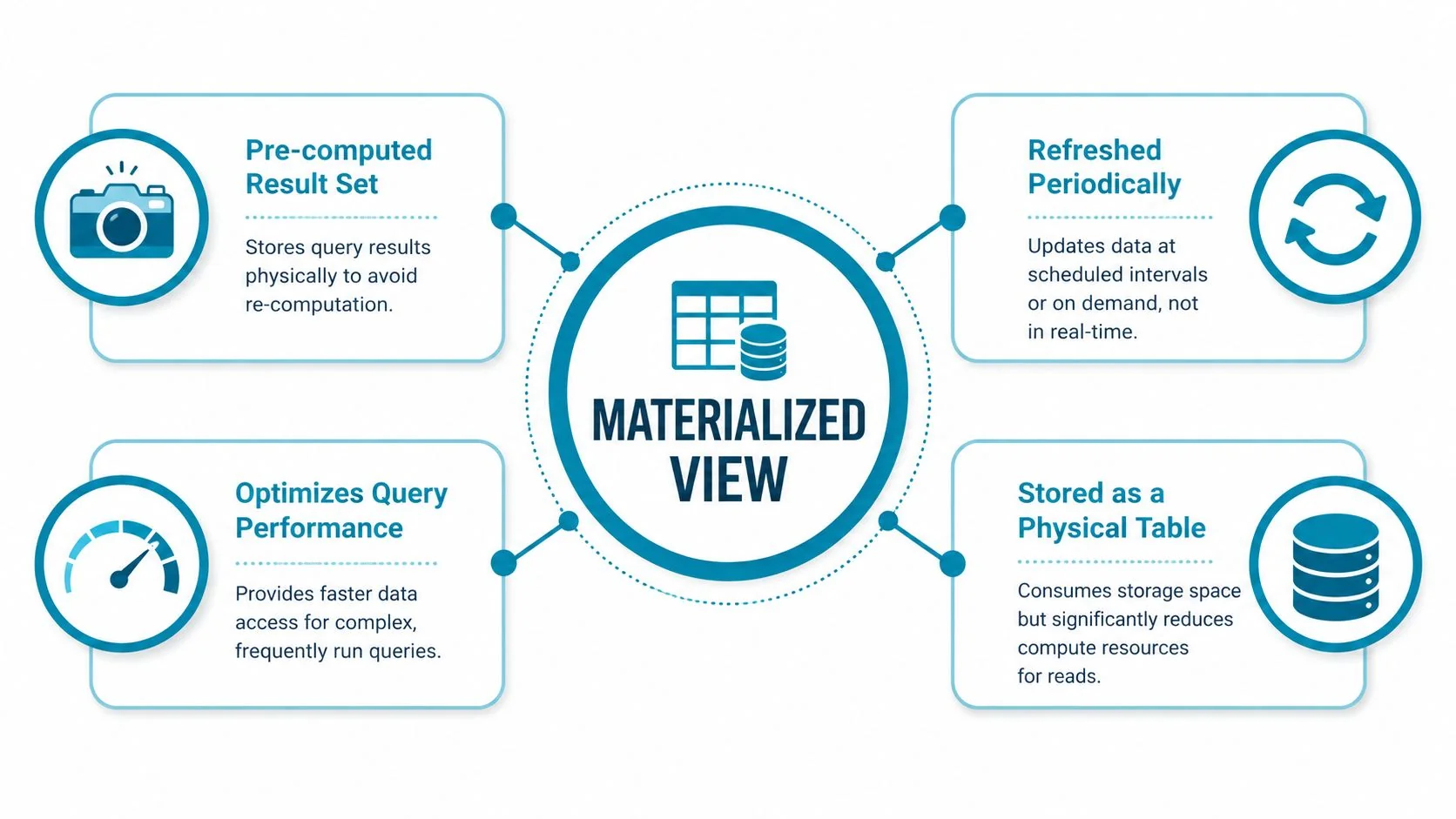
A materialized view is not a normal view with better marketing. It’s a physical table on disk that stores the result of a query. A standard view is virtual. It stores only the SQL definition and runs the underlying query every time someone calls it.
That distinction drives everything: speed, storage, refresh cost, and staleness risk.
Why it performs so well
When your analysts ask for daily revenue by region across years of transactions, the warehouse can either compute that from raw fact tables every time or read a prebuilt result. A materialized view gives it the second option. That’s why these objects can be dramatically faster for repeated analytical access.
According to Materialize’s explanation of why to use a materialized view, a materialized view stores the precomputed result set of a query as a physical table on disk, and independent industry analyses note that this can cut aggregate query latency by 80 to 95% for frequently executed analytical workloads, especially when base tables are large.
What you’re trading away
You are duplicating data. That means more storage, refresh work, and a real chance of stale results if the refresh cycle doesn’t match the business requirement.
A good materialized view is a managed artifact. A bad one is a copied dataset nobody remembers to refresh, monitor, or retire.
That’s the answer to the executive version of “what is materialised view.” It’s a deliberate trade. You spend storage and refresh compute to buy faster reads. That trade is often smart in Snowflake consulting, dbt model design, or enterprise dashboard acceleration. It becomes expensive fast when nobody owns the lifecycle.
Choosing Your Caching Strategy
The actual choice isn’t materialized view versus nothing. It’s which caching or precomputation pattern fits the workload.
Materialized views often act as a specialized cache for denormalized or aggregated BI surfaces and can be rebuilt from source data, which is why they’re closer to a disposable cache than to an operational source of record, as described in the materialized view pattern overview. That makes them useful in data engineering consulting where teams need to simplify normalized schemas for reporting.
Comparison of Data Pre-computation & Caching Strategies
| Criterion | Materialized View | Standard View | External Cache (e.g., Redis) |
|---|---|---|---|
| Data freshness | Scheduled or on-demand refresh. Not real-time by default. | Always reflects current underlying query results. | Depends on application invalidation and cache policy. |
| Implementation complexity | Moderate. Database-native but needs refresh design, ownership, and monitoring. | Low. Simple abstraction over SQL logic. | Higher. Requires application or service integration and invalidation logic. |
| Maintenance overhead | Ongoing. Refresh failures, lineage changes, storage growth, retirement. | Low to moderate. Query logic still needs maintenance. | High. Separate infrastructure, observability, and consistency handling. |
| Typical use case | Repeated BI dashboards, expensive joins, denormalized reporting tables | Semantic abstraction, access control, reusable logic | Low-latency app reads, session-heavy workloads, API acceleration |
My recommendation for leaders
Use a standard view when the query is simple and freshness matters more than speed.
Use a materialized view when the access pattern is repetitive, expensive, and predictable. This is the right fit for finance dashboards, executive reporting, and common rollups over large tables in Snowflake, BigQuery, or a lakehouse SQL layer.
Use an external cache when the read path lives outside the warehouse and the application needs ultra-fast responses with its own invalidation rules.
There’s a useful parallel in web performance. Teams that understand optimizing static asset caching already know the basic principle: cache aggressively when the access pattern is stable and the freshness policy is explicit. Materialized views apply the same logic inside the data platform.
Questions to force architectural clarity
- Why this layer: Is the team solving a warehouse query problem or compensating for a poor model?
- Why here: Should the precomputation live in dbt tables, a materialized view, or an external cache?
- Why now: Is the workload stable enough to justify lifecycle management?
If a consultant can’t answer those three questions cleanly, they’re guessing.
Materialized Views on Modern Data Platforms
The phrase “materialized view” sounds universal. In practice, platform behavior differs. That matters when you’re choosing consultants for Snowflake, Databricks, BigQuery, dbt, and Airflow-heavy delivery.
Snowflake
Snowflake is the cleanest example for enterprise buyers because the platform treats materialized views as a native performance primitive. Snowflake reports that materialized views can reduce query latency by 50 to 90% for complex aggregations, especially when base tables change infrequently and queries are frequent and costly, according to Snowflake’s materialized view guidance.
Example syntax:
create materialized view sales_mv as
select order_date, region, sum(amount) as total_sales
from fact_sales
group by order_date, region;
The key point for CTOs is refresh behavior and workload fit. Snowflake favors use cases where the base table changes infrequently and the materialized result serves a small slice of the base data. If you need help judging whether this pattern fits your estate, use that requirement to evaluate Snowflake consulting services. Ask consultants how they estimate refresh overhead before they create the object.
Databricks
Databricks changes the conversation because many teams solve the same problem with Delta tables, scheduled pipelines, or dbt-managed summary tables instead of leaning on a classic warehouse-style materialized view abstraction.
Example pattern:
create or replace table sales_summary as
select order_date, region, sum(amount) as total_sales
from fact_sales
group by order_date, region;
That isn’t the same product feature everywhere, and that’s exactly the point. On Databricks, you should evaluate whether the consultant understands medallion design, Delta optimization, and orchestration trade-offs rather than checking whether they know the term.
BigQuery
BigQuery supports materialized views, but leaders still need to push on refresh behavior, query rewrites, and operational ownership.
Example syntax:
create materialized view dataset.sales_mv as
select order_date, region, sum(amount) as total_sales
from dataset.fact_sales
group by order_date, region;
The practical issue isn’t writing the SQL. It’s deciding whether your reporting SLA, partitioning strategy, and spend controls make the object worth keeping.
A short explainer helps if your team is mixing platform terminology:
Platform expertise shows up in the exceptions. Any consultant can create a materialized view. A strong one knows when not to.
According to DataEngineeringCompanies.com’s analysis of 86 data engineering firms, platform-specific delivery quality varies more in governance and operating discipline than in raw SQL implementation. That’s exactly where materialized view strategies succeed or fail.
The Hidden Costs and Governance Traps
Such situations often reveal vulnerabilities. Performance wins are visible. Materialized view costs are often buried.
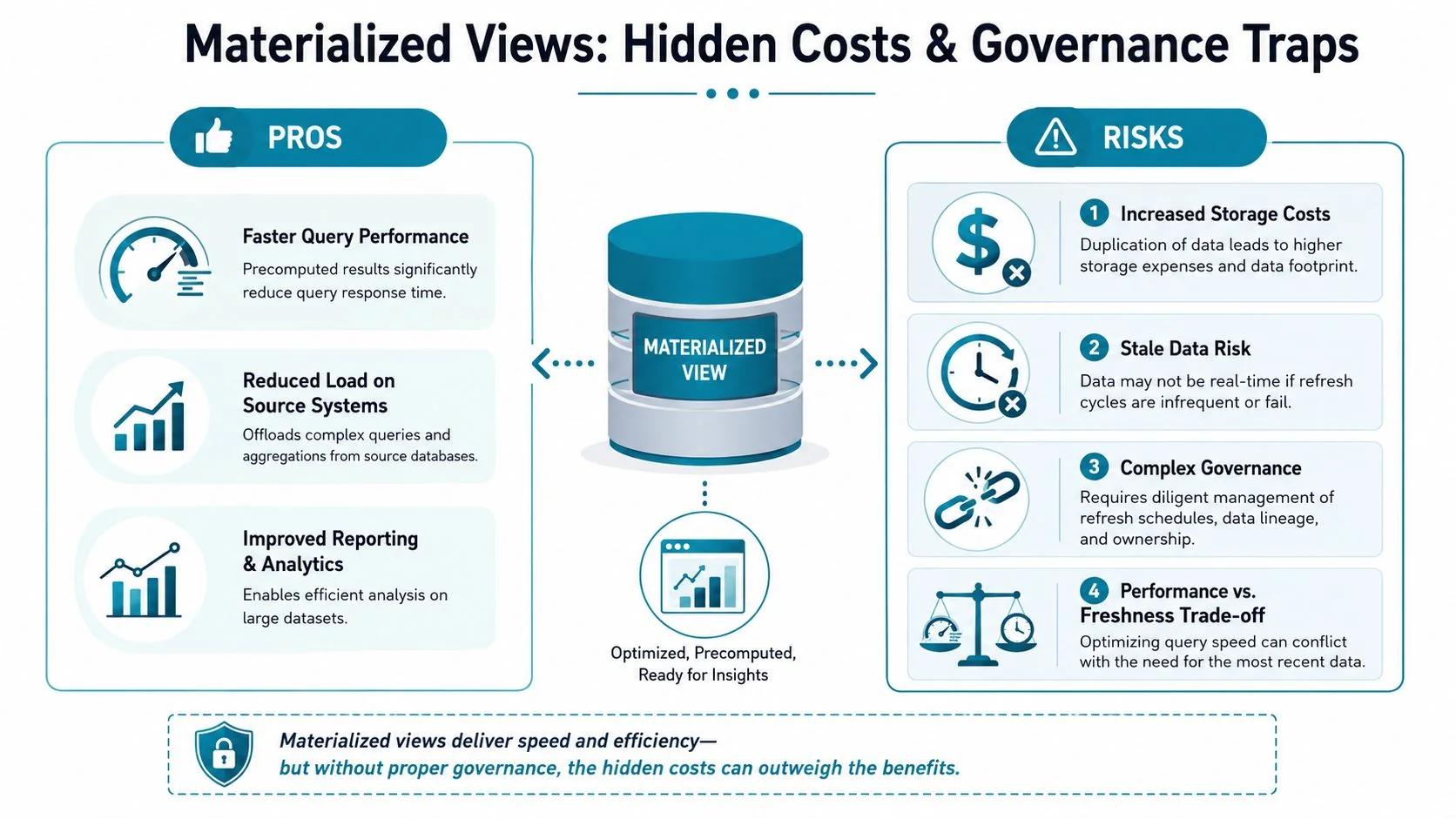
A 2023 Gartner note highlighted that precomputed artifacts like materialized views can double or triple storage costs when over-provisioned, and they often escape standard cost allocation and FinOps tagging because teams treat them as implementation details rather than governed assets, as summarized in AWS’s materialized view overview.
Where costs hide
- Storage duplication: Every materialized view creates another physical copy of selected data.
- Refresh compute: The warehouse still has to recompute and maintain the object.
- Operational drift: Source model changes break lineage, invalidate assumptions, or leave dead objects behind.
Governance failures I see most often
The first failure is ownership. Nobody knows whether the Head of BI, the data platform team, or the analytics engineering team owns refresh policy and retirement.
The second is tagging. If your FinOps model tracks warehouses, jobs, and storage buckets but ignores precomputed artifacts, you don’t have cost transparency.
The third is stale data. Teams promise “fast dashboards” but never define acceptable lag by use case.
Fast and wrong is still wrong. If the dashboard drives pricing, fraud review, or inventory decisions, stale data is an operational risk, not a reporting annoyance.
If your team hasn’t tied materialized views into lineage, access policy, incident response, and review cadences, start with stronger data governance best practices for 2025. This isn’t bureaucracy. It’s how you stop a useful optimization from turning into platform sprawl.
How to Evaluate Your Materialized View Strategy
The fastest way to judge maturity is to ask sharper questions. Don’t ask whether your consultants “use materialized views.” Ask how they decide not to.
A 2025 Everest Group survey found that nearly 60% of firms attempting AI and ML enablement reported stale or inconsistent feature data tied to precomputed aggregates like materialized views, but only 27% had documented policies for refresh cadence and data lineage, according to Microsoft’s materialized view pattern page. That’s the line between legacy BI thinking and a modern platform strategy.
The CTO checklist
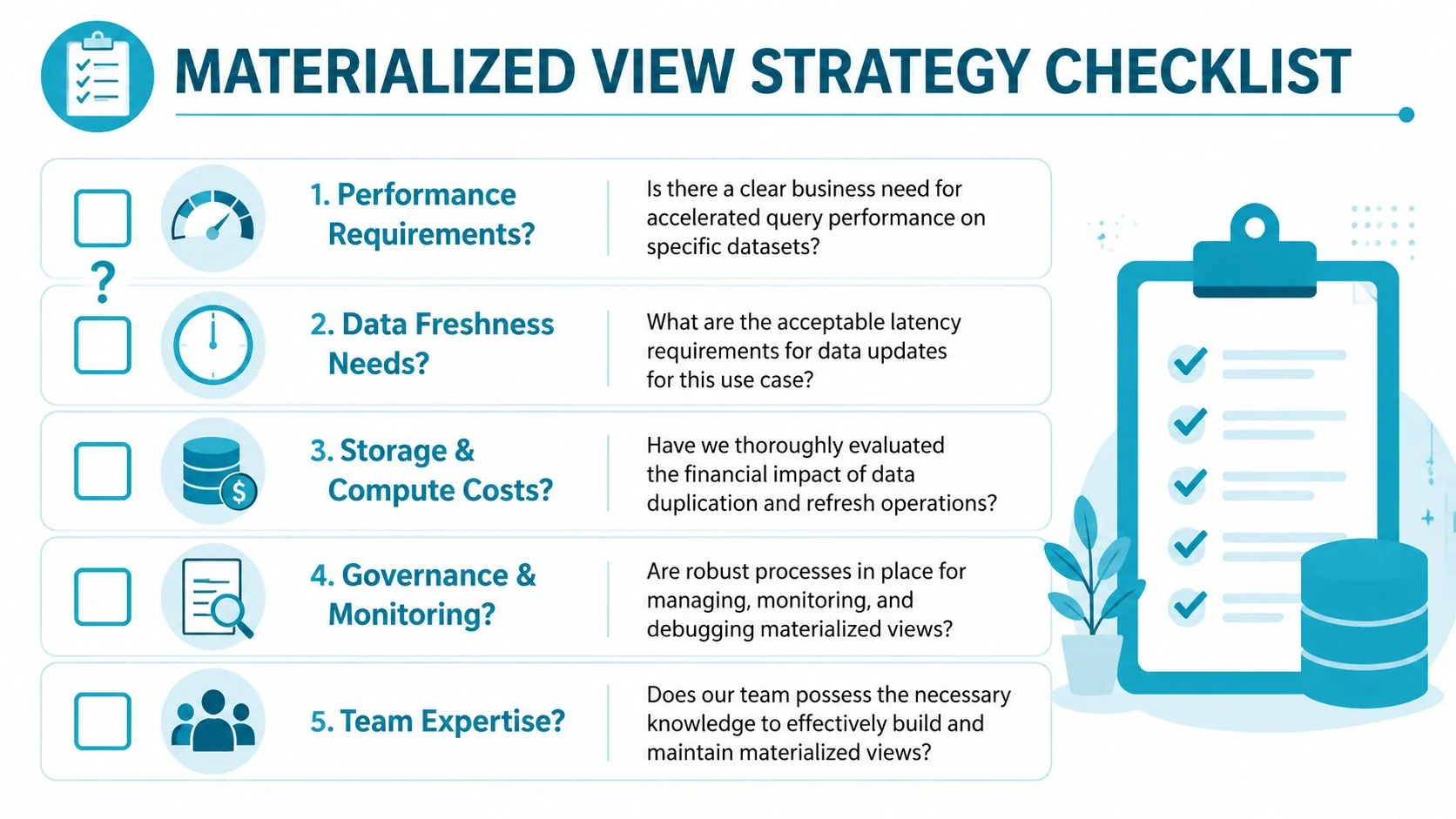
- Performance need: Which exact dashboards, models, or APIs justify precomputation, and what query pattern are we accelerating?
- Freshness policy: What lag is acceptable for each use case, and who signs off on that SLA?
- Cost visibility: How do we track storage and refresh cost per materialized view?
- Lifecycle control: What’s the policy for versioning, ownership transfer, and retirement?
- AI and ML readiness: If these views feed feature engineering or scoring pipelines, how do we prevent stale features and lineage gaps?
Questions to ask a consulting partner
- Show me one example of when you rejected a materialized view and used dbt tables, summary tables, or another pattern instead.
- Explain how you monitor refresh failures, stale objects, and unused artifacts.
- Tell me who owns these objects after go-live. Platform engineering, analytics engineering, or BI?
- Map the design to our cloud platform. Snowflake, Databricks, BigQuery, AWS, Azure, and GCP don’t behave the same.
- Prove that your recommendation includes FinOps and governance, not just faster SQL.
If a partner talks only about speed, they’re selling a demo. If they talk about speed, cost, ownership, and retirement, they’re designing an operating model.
The next step is simple. Audit every existing materialized view in your environment. Keep the ones tied to a named workload, explicit SLA, and monitored refresh path. Challenge everything else. If you’re selecting a partner to modernize your platform, use DataEngineeringCompanies.com to compare firms, shortlist specialists by platform and governance depth, and pressure-test whether their materialized view strategy reflects engineering maturity or expensive habit.
Researched & written by
Data-driven market researcher with 20+ years in market research and 10+ years helping software agencies and IT organizations make evidence-based decisions. Former market research analyst at Aviva Investors and Credit Suisse.
Previously: Aviva Investors · Credit Suisse · Brainhub · 100Signals
Vetted partners
Featured Data Engineering Partners
Vetted firms whose specialty matches this article.
Related Analysis

A CTO's Guide to Ecommerce Data Engineering
Build a high-performance ecommerce data engineering architecture. Compare platforms, integration patterns, and vendor selection criteria for maximum ROI.
How to Hire an Apache Kafka Consulting Firm That Delivers
A guide for engineering leaders on scoping, vetting, and hiring the right Apache Kafka consulting partner. Learn to avoid pitfalls and maximize your ROI.
Data Engineering for Private Equity: The 2026 Guide
A complete guide to data engineering for private equity. Learn use cases, Snowflake & Databricks architectures, vendor selection, and 2026 cost benchmarks.