Actionable Playbook for Snowflake to Databricks Migration
A Snowflake to Databricks migration moves your warehouse workloads onto the Databricks Lakehouse platform - consolidating BI, data engineering, and machine learning onto one system instead of stitching Snowflake to separate ETL and ML tools. It is a platform re-architecture, not a lift-and-shift: SQL and procedural logic get translated and rebuilt, and governance moves to Unity Catalog.
Why Do Engineering Teams Migrate From Snowflake to Databricks?
Teams move off Snowflake when the warehouse becomes a bottleneck for data science and ML work - when the organization needs an integrated environment for engineering, analytics, and machine learning instead of a warehouse plus a separate stack of ETL and ML tools bolted onto it.

The primary business drivers for this migration are:
- Lower Total Cost of Ownership (TCO): Data stacks comprising Snowflake for warehousing, another tool for ETL, and a third for ML create redundant licensing and infrastructure fees. Consolidating on Databricks eliminates these costs.
- Unified Governance: Managing security, access, and compliance across multiple systems is operationally complex. Databricks Unity Catalog provides a single governance model for all data assets - from tables to ML models - simplifying administration.
- Integrated AI/ML Capabilities: Databricks, built on Apache Spark, is designed for large-scale data processing and machine learning. Teams no longer need to extract large datasets from the warehouse to train models, which accelerates development cycles.
This is not a niche trend. Multiple industry market-research firms put the global data lakehouse market on a sustained double-digit compound annual growth trajectory through the early 2030s, driven by the same consolidation logic described above. Staying on a warehouse-only platform carries a real opportunity cost as that shift continues.
The core difference is architectural philosophy. Snowflake perfected the cloud data warehouse. Databricks built a unified platform for data and AI. For a deeper dive into their architectural differences, read our complete Snowflake vs. Databricks comparison.
How Do You Build a Pre-Migration Cost and Readiness Model?
A Snowflake to Databricks migration succeeds or fails before a single line of code is translated. Build a model that scores your codebase’s complexity and maps it against a realistic total cost of ownership - without that analysis, you are budgeting and scheduling blind.

This process starts with a forensic audit of your current Snowflake environment. Inventory every asset: SQL queries, stored procedures, Snowpark jobs, UDFs, tasks, and data streams. This inventory forms the foundation of your migration plan.
How Do You Quantify the Migration Effort?
Score each asset’s complexity after the inventory is complete. A simple SELECT statement and a 2,000-line stored procedure with Snowflake-specific functions represent wildly different amounts of work, so a scoring system is what turns that gap into a plannable, prioritized timeline.
- Low Complexity: Standard ANSI SQL queries and basic views. These often migrate with near-zero-touch automation.
- Medium Complexity: Queries using proprietary Snowflake SQL functions, simple Snowpark dataframes, or Snowpipe ingestion. These require translation, but the patterns are well-understood and often automatable.
- High Complexity: Nested stored procedures, complex UDFs, streams, and tasks. This procedural logic cannot be directly translated; it must be manually re-architected into a Databricks notebook or a Delta Live Tables pipeline.
This scoring provides a quantifiable measure of technical debt, turning a vague “it’s complex” into an actionable plan for prioritization and realistic timeline setting.
How Do You Build a Realistic TCO Model?
A Total Cost of Ownership model has to account for how differently Snowflake and Databricks structure compute, storage, and engineering cost - a simple license-to-license comparison misses most of the real difference. The table below breaks out the cost drivers that actually diverge between the two platforms.
| Cost Factor | Snowflake Approach | Databricks Approach | Migration Implication |
|---|---|---|---|
| Compute Model | Bundled compute (Virtual Warehouses) with per-second billing. Sized T-shirt models (XS, S, M, etc.). | Unbundled compute (Databricks Units or DBUs) billed per-second. Granular control over VM types. | Databricks is often cheaper for consistent workloads if tuned properly. Snowflake is more cost-effective for sporadic, ad-hoc queries due to its auto-suspend feature. |
| Storage | Storage costs are separate from compute, billed at pass-through rates from the cloud provider plus a markup. | Uses your own cloud storage account (BYOS). You pay the cloud provider directly for storage. | Databricks offers direct control and potential savings on storage but requires you to manage the cloud storage lifecycle. |
| Engineering Overhead | Designed for ease of use, often requiring less specialized platform engineering. | Requires more skilled engineering (Spark, Scala, Python) to optimize infrastructure for price/performance. | Your team’s existing skill set is a major cost factor. A Spark talent gap requires budgeting for training or consulting. |
| Workload Specialization | A single architecture for BI, analytics, and some data science. | Specialized runtimes and compute options for SQL, ML, and streaming, allowing for tailored optimization. | You must map Snowflake workloads to the correct Databricks cluster type to achieve cost-efficiency; a one-size-fits-all approach is expensive. |
A common and costly mistake is underestimating the cost of running parallel environments. During a phased migration, you will pay for both Snowflake and Databricks. This dual-cost period can last for months, and your budget must have a line item for it. Learn more about how these economic models differ at Invene.com.
Factor in these real-world costs:
- Engineering Effort: Use complexity scores to estimate person-hours for code conversion, logic re-platforming, and testing.
- Talent & Training: Budget for hiring, training, or consultants if you lack Spark, Scala, or advanced Python skills.
- Migration Tooling: Include costs for any third-party automation tools for code translation or validation.
- Egress Fees: Snowflake charges data egress fees for the initial export of data to your cloud storage. This is a significant one-time cost.
How Do You Translate Snowflake Workloads to Databricks?
A Snowflake to Databricks migration is a translation project, not a “lift-and-shift.” The work maps Snowflake’s proprietary, SQL-first environment onto the open standards of the Databricks Lakehouse Platform - schema by schema, procedure by procedure.
How Do You Map Snowflake Data Structures to Databricks?
The first technical task is translating Snowflake DDL (Data Definition Language) into a format compatible with Delta Lake, which stores and manages data differently enough that a straight syntax swap is not sufficient.
- Tables and Views: Standard ANSI SQL tables and views will migrate with minimal changes. Automated tools can handle this, but manual inspection of views using Snowflake-specific functions is required.
- VARIANT Type: Snowflake’s proprietary
VARIANTtype for semi-structured data must be mapped to aJSONstring or nativestructsandarraysin Delta tables. Queries must be rewritten to use Databricks’ JSON parsing functions (from_json,get_json_object). - Time Travel: Both platforms offer historical data querying. Snowflake’s Time Travel is equivalent to Delta Lake’s transaction log, which enables querying past table states via
VERSION AS OForTIMESTAMP AS OF. Scripts must be adapted to the new syntax.
Expert Tip: The
VARIANT-to-JSON conversion strategy is a common failure point. A migration plan must account for how this data will be stored, ingested, and queried in the new environment.
How Do You Convert Procedural Logic and Ingestion Pipelines?
Procedural code - business logic in stored procedures and UDFs - demands manual re-architecture, not automated translation. Snowflake’s JavaScript Stored Procedures have no direct equivalent. This logic must be refactored into a Databricks Notebook using Python or Scala. While more work upfront, this yields improved testability, version control, and integration with the PySpark ecosystem.
Simple SQL UDFs can be converted to Databricks SQL UDFs. Complex UDFs are best rebuilt as part of a notebook or a Delta Live Tables (DLT) pipeline for better long-term manageability.
What Are the Key Snowflake to Databricks Feature Mappings?
Snowpipe maps to Auto Loader, Tasks and Streams map to Delta Live Tables or Scheduled Jobs, and Stored Procedures map to Notebooks or SQL UDFs - the table below covers the migration consideration for each.
| Snowflake Feature | Databricks Equivalent | Key Migration Consideration |
|---|---|---|
| Snowpipe | Auto Loader | Both offer automated file ingestion. Auto Loader provides superior schema inference and evolution, reducing manual DDL adjustments. |
| Tasks & Streams | Delta Live Tables (DLT) or Scheduled Jobs | Simple Snowflake Tasks can be replaced by Databricks Jobs. For CDC patterns using Streams and Tasks, re-architect them into a DLT pipeline for a more reliable, declarative framework. |
| Stored Procedures | Notebooks (Python/Scala) or SQL UDFs | Simple, self-contained procedures may map to SQL UDFs. Logic with loops, error handling, or complex branching must be refactored into a notebook. This is a manual but necessary upgrade. |
The security model must be translated carefully. Snowflake’s Role-Based Access Control (RBAC) and data masking policies have a strong equivalent in Databricks Unity Catalog. Unity Catalog provides a unified governance layer for implementing fine-grained row- and column-level security across all data and AI assets.
How Should You Structure a Phased Migration?
A “big bang” migration from Snowflake to Databricks is a recipe for failure. Break the work down by business domain or data product and run it as a phased, iterative execution instead - it de-risks the project and gives stakeholders visible progress along the way.
The process involves the parallel translation of three components: data schemas, business logic (SQL), and ingestion pipelines.
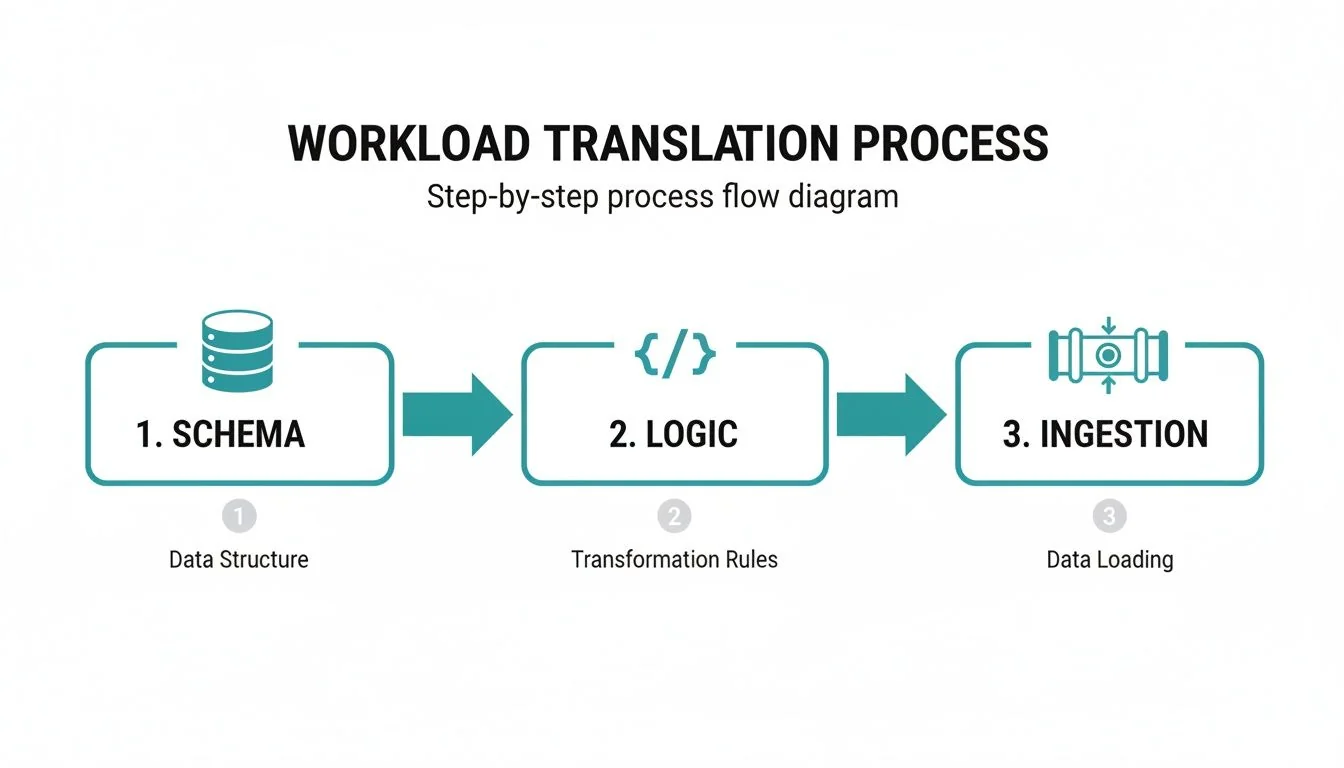
As the diagram illustrates, schema migration, logic conversion, and ingestion re-architecture are multi-threaded, not linear.
Which Migration Tools Should You Use?
Automation speeds up translation, but the right tool depends on how standard your SQL is. There are three primary options:
- Databricks Lakebridge: Databricks’ free, open tool for profiling, SQL conversion, and validation. It automates the bulk of routine SQL translation and is a reasonable starting point for most migrations.
- Third-Party Tools: Specialized vendors offer code translation tools that excel with complex, non-standard SQL or proprietary Snowflake features.
- Custom Scripts: For teams with deep engineering expertise, building custom conversion scripts offers total control but requires a significant development investment. This is only viable in unique situations.
For most projects, a hybrid approach is best: use Lakebridge for bulk conversion and have experts manually refactor complex or critical components. Automate what you can; re-architect where it counts. Our guide on data migration best practices provides broader strategies.
Why Is Validation Non-Negotiable in a Migration?
Validation has to be continuous and multi-layered, not a final checkbox before cutover. A migration without rigorous, parallel validation is just a data copy-and-paste exercise - you have to prove functional equivalence, performance, and cost before decommissioning Snowflake.
- Data Integrity Validation: Perform cell-by-cell comparisons on data subsets to ensure perfect data transfer from source to target.
- Performance Benchmarking: Run critical queries in both Snowflake and Databricks to prove that Databricks meets or exceeds performance SLAs.
- Financial Validation: Monitor Databricks Unit (DBU) consumption against your TCO model to confirm projected cost savings.
This three-pronged validation approach is your defense against post-cutover surprises.
How Do You Select the Right Migration Partner?
Vet for certified, hands-on experience in both Snowflake and Databricks, not a generalist IT firm that dabbles in one. Of the 86 firms profiled in the Data Engineering Companies Index, 64 list Databricks and 66 list Snowflake as a core platform; 78 name data migration among their capabilities. Listing a platform as a capability is not the same as fielding certified dual-platform migration experts - the checklist below is how you tell the two apart. Browse the Databricks consulting directory to compare vetted firms directly.
Core Evaluation Criteria Checklist
Be wary of partners skewed toward one platform. A Snowflake-heavy team may try to force a Snowflake architecture onto Databricks, creating a more expensive, less efficient system.
Use this checklist when vetting partners:
- Dual-Platform Experience: Do they have certified experts and specific project references for both Snowflake and Databricks? Demand case studies detailing a warehouse-to-lakehouse migration.
- Unity Catalog Mastery: Can they explain how they will map your Snowflake security and RBAC into a unified governance model on Unity Catalog? A fumbled answer is a major red flag.
- Automation Strategy: Which tools do they use for code migration? Do they have a realistic commitment to an automation percentage and a proven method for combining automation with manual refactoring?
Run a Structured Selection Process
Conduct a formal Request for Proposal (RFP) process. An RFP forces potential partners to provide detailed proof of their skills and transparent pricing, enabling a true apples-to-apples comparison.
A structured framework ensures you find a partner who will achieve the strategic goals of your migration, not just tick a technical box.
Answering Your Snowflake to Databricks Migration Questions
Here are direct answers to the most common questions from engineering leaders.
How Long Does a Typical Migration Take?
For a mid-sized company, a full migration takes 9 to 18 months. The timeline depends on data volume, the complexity of custom logic, and the number of connected reports and dashboards.
Start with a pilot project on a single business unit or data product. This can be completed in 8 to 12 weeks and provides a quick win. Timelines are most often derailed by a shallow pre-migration assessment and underestimating the time required for testing and validation.
What Is the Biggest Technical Hurdle?
The biggest hurdle is untangling procedural logic from complex stored procedures and UDFs. While tools can automate standard SQL, this embedded business logic requires manual analysis, re-architecture, and rebuilding, typically in Python notebooks. This manual effort is a common source of budget overruns. Another challenge is transitioning from Snowflake’s proprietary data sharing to the open Delta Sharing standard, which requires careful planning with external partners.
Can We Run Snowflake and Databricks in Parallel?
Yes, and you must. Running both platforms side-by-side during a phased migration is the only safe approach. This dual-platform strategy acts as a safety net, ensuring business continuity.
Set up a data sync from Snowflake to your cloud storage (S3, ADLS Gen2). Databricks can then ingest this data using tools like Auto Loader. This keeps the new Databricks environment fresh for side-by-side validation of migrated pipelines.
A dual-platform strategy is non-negotiable for a smooth transition. It allows for meticulous testing and a controlled cutover, but remember to explicitly budget for these overlapping costs, as you will be paying for both services during this period.
The objective of parallel operation is to migrate and validate workloads one by one, ensuring each performs correctly before decommissioning the original. This systematic cutover prevents post-migration failures.
A qualified partner needs certified, hands-on expertise in both Snowflake and Databricks, not just one. Compare vetted firms with proven migration methodologies in the Databricks consulting directory, read the full Snowflake vs. Databricks comparison before you scope the project, or review broader data migration best practices for the phases that apply beyond this one platform pair.
Part of our guide
Data Migration →
Part of our guide
Snowflake Consulting →
Part of our guide
Databricks Consulting →
Researched & written by
Data-driven market researcher with 20+ years in market research and 10+ years helping software agencies and IT organizations make evidence-based decisions. Former market research analyst at Aviva Investors and Credit Suisse.
Previously: Aviva Investors · Credit Suisse · Brainhub · 100Signals
Vetted partners
Top Data Migration Partners
Vetted firms whose specialty matches this article.
More in Data Migration
What is a semantic layer? A Practical Guide for AI and BI Data Unification
Discover what is a semantic layer and how it unifies data for AI and BI, including Snowflake and Databricks.
dbt Implementation Partners: Who Can Tame Your DAG in 2026?
Choosing the right dbt Labs partner for your analytics engineering transformation. We compare Premier vs. Specialized boutique partners.
Snowflake Partners vs. Databricks Partners: Who Should You Hire in 2026?
Confused between hiring a Snowflake or Databricks partner? We compare the ecosystems, partner specializations, and how to choose the right expert for your data platform.