A Practical Guide to Snowflake Cost Optimization
Snowflake cost optimization comes down to controlling three levers: warehouse size, how long warehouses sit idle, and how much data each query scans. Compute is almost always the biggest line item, so right-sizing warehouses and killing idle time deliver the fastest savings. The pay-as-you-go model rewards active management and punishes the “set it and forget it” habit that works fine on a fixed-cost, on-premises system.
Why Snowflake Costs Escalate
Snowflake’s consumption-based model is its biggest selling point and its biggest financial risk. Provisioning a powerful warehouse takes seconds, which is exactly what makes it easy to overspend.

Treating a consumption-based service like a fixed-cost system is a common and costly mistake. Companies often watch costs climb faster than data volume or business value, and it’s rarely a platform flaw - it’s a symptom of passive management.
What Drives Your Snowflake Bill
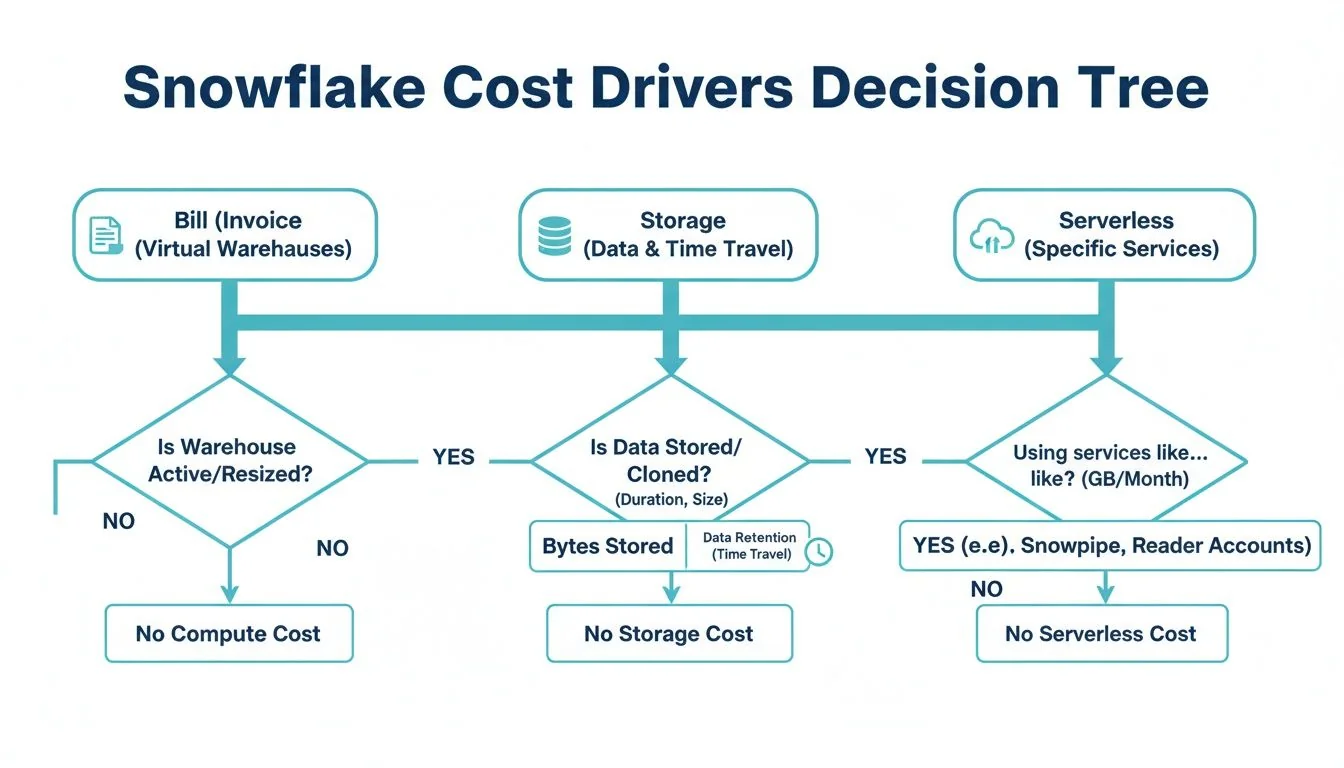
Your invoice breaks down into three components, and they don’t carry equal weight.
- Compute (Virtual Warehouses): The processing engine for every query, and typically the largest cost component on the bill. Credits are billed per second whenever a warehouse is active, and cost doubles with each warehouse size increase rather than scaling linearly.
- Storage: Compressed data stored in Snowflake, including data retained for Time Travel and Fail-safe. Usually a smaller share of the bill than compute, but it grows quietly if retention policies go unmanaged.
- Cloud Services & Serverless Features: Background processes like authentication, metadata management, and serverless tasks such as Snowpipe or Automatic Clustering. Normally a minor slice, but inefficient queries can push these costs up without warning.
Cost management is about getting value from each credit spent. An expensive query powering a high-revenue report is a sound investment. An idle warehouse burning credits over a weekend is a pure loss.
How Do You Read a Snowflake Bill?
A Snowflake invoice itemizes spend into compute, storage, and cloud services, with compute driving most of the total. Start by pulling QUERY_HISTORY and WAREHOUSE_METERING_HISTORY to see which warehouses and queries are consuming credits before you touch any settings.
The Warehouse Scaling Trap
Snowflake’s “T-shirt” sizing (X-Small, Small, Medium, Large, X-Large…) looks simple, but the credit cost doubles with each step up. An X-Large warehouse doesn’t cost incrementally more than a Small one - it costs 8 times more per hour (16 credits versus 2), according to Snowflake’s documented warehouse credit table. Leave an oversized warehouse running and that exponential curve empties a budget fast.
It’s common to see quarterly Snowflake spend climb well ahead of data volume growth. When that happens, the gap is almost always compute - an oversized or poorly-suspended warehouse, not the underlying data - driving the increase.
Our comparison of Snowflake vs. Databricks walks through how the two platforms structure compute costs differently, which is useful context if you’re weighing a migration rather than just tuning your current setup.
Two Metrics Worth Tracking Today
- Cost per query. Join
QUERY_HISTORYandWAREHOUSE_METERING_HISTORYto calculate credit consumption per query. A high cost per query usually means an inefficient SQL statement or an oversized warehouse. - Warehouse idle time. The time a warehouse sits active without processing queries - pure waste. High idle time means your auto-suspend setting is too lenient.
How Do You Cut Snowflake Compute Costs?
Right-size warehouses, isolate workloads by job type, and set aggressive auto-suspend timers. Compute is the largest line item on most Snowflake bills, so this is where optimization work pays off fastest - and none of it requires halting data initiatives, just eliminating waste from idle or oversized resources.
Warehouse Right-Sizing Is Your Biggest Lever
The instinct to provision a bigger warehouse for “better performance” often just means paying for capacity nobody uses. Since each size increase doubles credit consumption, Large through 2X-Large warehouses run 8 to 32 times the credits of an X-Small. Most routine workloads - data loading, standard BI queries - can’t productively use more than 10-16 cores; anything beyond that is wasted spend.
A practical test: run the same query on two warehouse sizes. If it finishes in two minutes on a Medium and one minute fifty seconds on a Large, you’re paying double the credits for a ten-second improvement.
Snowflake Warehouse Sizing Cost and Use Case Matrix
| Warehouse Size | Credits per Hour | Example Use Case | Optimization Tip |
|---|---|---|---|
| X-Small | 1 | Ad-hoc queries; development environments; light data loading. | Optimal for individual developers. Set an aggressive auto-suspend timer. |
| Small | 2 | Scheduled data ingestion (COPY INTO); BI dashboards with low concurrency. | Ideal for lightweight, automated tasks. Monitor query queuing to assess scaling needs. |
| Medium | 4 | Running dbt models for small to mid-sized projects; moderately complex transformations. | A solid default for many ELT/ETL jobs. Test against a Small warehouse to find the optimal size. |
| Large | 8 | Complex transformations on large datasets; initial data backfills. | Reserve for heavy-lifting; ensure it does not run idle. Isolate from other workloads. |
| X-Large | 16 | Intensive data science modeling; processing multi-billion row tables. | For exceptionally demanding jobs only. This size accrues costs rapidly; monitor it closely. |
| Multi-Cluster | Varies | High-concurrency BI dashboards with many active users (e.g., Looker, Tableau). | ”Scale out” to handle user volume and prevent query queuing, rather than “scaling up.” |
Credits per hour reflect Snowflake’s published Gen1 warehouse table. Validate against your own workloads before locking in a size.
Consolidate Warehouses and Isolate Workloads
“Warehouse sprawl” - every team or developer running a dedicated warehouse - is a common anti-pattern that leaves multiple underutilized warehouses burning credits. A better approach organizes warehouses around workloads, not teams:
- Ingestion Warehouse (e.g., Small): Dedicated to
COPY INTOcommands and other loading scripts. - Transformation Warehouse (e.g., Medium/Large): For complex dbt models or other intensive ELT jobs.
- BI & Analytics Warehouse (e.g., X-Small, Multi-cluster): Optimized for concurrency across many simultaneous dashboard users.
Isolating workloads this way prevents a long-running transformation from blocking an executive dashboard query, and it lets you size each warehouse precisely instead of guessing at one number that has to work for everything.
Scale Up vs. Scale Out: A Simple Framework
Once workloads are isolated, decide whether to “scale up” (bigger warehouse) or “scale out” (more clusters):
- Is the problem query complexity? For a few large, complex queries - heavy joins, big aggregations - scale up. More memory and processing power gets the job done faster.
- Is the problem user concurrency? For a high volume of smaller, faster queries - a popular BI dashboard, say - scale out. A multi-cluster warehouse handles that load without queuing users.
Use Aggressive Auto-Suspend and Maximize Caching
Set auto-suspend timers to 60 seconds as a starting point. Every idle minute is wasted money, and a 5- or 10-minute timer that “feels safer” adds up to real unnecessary spend over a month.
Second, push teams toward query patterns that hit Snowflake’s result cache. When the same query runs repeatedly - a common pattern for dashboards - Snowflake returns the cached result in milliseconds without spinning up a warehouse, which is effectively a free query. Standardized reports and consistent query patterns maximize cache hits.
How Do You Cut Query and Storage Costs?
Reduce the amount of data each query scans, and set retention periods deliberately instead of leaving defaults in place. After warehouse compute, this is the next layer of savings - an unoptimized query scans far more data than it needs.
Master Your Queries to Minimize Data Scans
Every byte read from storage carries a cost, so reducing scanned data is the single most effective query optimization.
Table clustering helps when queries frequently filter on a specific column - a date or customer ID, say. Clustering physically co-locates data by that column’s values, which cuts micro-partition scanning. Well-implemented clustering and query tuning can meaningfully reduce query costs on large tables by eliminating wasteful reads, though the exact savings depend heavily on your table’s query patterns.
Materialized views pre-compute results for common, complex queries.
A materialized view works like a pre-built summary. Instead of recalculating a complex sales metric every time an executive dashboard loads, Snowflake retrieves the pre-computed result - less compute, and near-instant load times for those workloads.
Finally, set query timeouts. A runaway query - an accidental cross-join on two large tables, for instance - can run for hours and rack up a massive bill. A STATEMENT_TIMEOUT_IN_SECONDS parameter at the warehouse or user level acts as a safety net that automatically kills queries past the limit.
Get Strategic With Your Storage
Storage is usually a smaller share of the bill than compute, but unchecked data growth still adds up. The goal is balancing recoverability against cost.
The Time Travel retention period deserves a second look. Snowflake’s default is 1 day for all editions; Enterprise Edition and higher lets you extend it up to 90 days. Raising that default to the 90-day maximum on a large, frequently updated table can meaningfully increase its storage footprint, so extend retention deliberately rather than as a blanket setting - see Snowflake’s Time Travel documentation for the exact mechanics.
Two concrete moves:
- Tiered retention: short retention (1 day) for staging tables, moderate (7-14 days) for core business tables, and longer only where compliance requires it.
- Transient tables: for temporary data - intermediate ELT steps, for example -
TRANSIENTtables skip the Fail-safe period and cap Time Travel at 1 day, which cuts their storage overhead substantially.
If your team is choosing between a warehouse-centric or lakehouse-style architecture in the first place, our data warehouse vs. data lake guide covers the cost tradeoffs of each approach.
Get More From the Result Cache
The result cache is worth building workflows around. Run an identical query twice and Snowflake serves the second result from cache without activating a warehouse - a real performance boost at zero compute cost.
This matters most for BI dashboards. Train analysts to use standardized filters and avoid non-deterministic functions like CURRENT_TIMESTAMP(), which break cache hits by making every query unique. Get that right and hundreds of dashboard users can share the cost of a single initial query.
How Do You Build Lasting Snowflake Cost Governance?
Tag every warehouse and query by team or project, set resource monitors with hard credit caps, and add third-party tooling once you outgrow native alerts. Optimization erodes without ongoing governance - a one-time cleanup buys a few good months, not a lasting fix.

The point is to make every dollar of spend attributable to a team, project, or cost center, not to restrict access.
Establish a Clear Tagging Strategy
You can’t control what you can’t measure, and you can’t measure what you can’t identify. Tag every compute resource - warehouses, tasks, queries - with at minimum:
team: the owning team (e.g.,marketing-analytics)project: the specific initiative (e.g.,q4-campaign-analysis)environment: deployment stage (e.g.,prod,dev,test)
A consistent tagging policy is the foundation for any showback or chargeback model - it turns an opaque total into a ledger business units can actually read. For more on setting up these policies, see our data governance best practices guide.
Implement Proactive Resource Monitors
Finding out about a cost overrun at month-end is too late. Snowflake’s built-in resource monitors let you set credit quotas for the account or individual warehouses and configure actions at specific thresholds - email at 75% of the monthly quota, notify a wider team at 90%, and auto-suspend at 100%.
Where Third-Party Monitoring Tools Fit
Native Snowflake tools are good for hard limits; third-party cost platforms add deeper analysis on top. Their strengths:
- Anomaly detection: flagging sudden spikes in warehouse usage or query costs automatically.
- Automated recommendations: suggesting specific optimizations, like downsizing a warehouse or flagging unused tables.
- Root cause analysis: drilling down to the specific user, query, or dbt model behind a cost spike.
When Should You Bring in a Snowflake Cost Optimization Partner?
Bring in external help when budget overruns persist despite internal effort, when query performance is degrading and the cause isn’t obvious, or when the team lacks deep Snowflake-specific FinOps expertise. Even a skilled internal team hits diminishing returns eventually - 66 of the 86 firms profiled in the Data Engineering Companies Index list Snowflake as a core platform, which gives you a real pool of firms to evaluate rather than a handful of generalists.
A specialist consultancy has usually seen architectural inefficiencies across many more Snowflake implementations than one internal team ever will. The trigger is often a specific event: a complex data migration where cost-effective architecture matters from day one, or the need for a third-party audit to validate the current strategy and surface hidden savings.
Signs It’s Time for an Expert
- Persistent budget overruns: the bill consistently exceeds forecast and your team can’t pin down why.
- Performance degradation: queries slowing, dashboards lagging, business users noticing.
- Missing specialized skills: strong at data analysis, thin on Snowflake architecture, tuning, or FinOps practice.
- No bandwidth for proactive work: engineers are fully consumed by delivery, with nothing left for cost management.
A good partner should deliver savings that clearly exceed their fees within a few months, and should transfer enough knowledge that your team can sustain the improvements after the engagement ends. Our directory of Snowflake consulting firms is a starting point for building a shortlist, and our data engineering consulting rates guide will help you build the business case.
RFP Checklist for Snowflake Cost Optimization Partners
| Evaluation Category | Key Questions to Ask | Desired Response / ‘Green Flag’ |
|---|---|---|
| Proven Experience | Provide case studies of Snowflake cost optimization projects with quantifiable results. | They readily share detailed case studies with specific, verifiable savings and performance gains. |
| Technical Expertise | Describe your team’s certifications and direct experience with Snowflake features like clustering, caching, and warehouse management. | The team holds current Snowflake certifications and can discuss architectural patterns with specificity. |
| Methodology & Process | What is your process for auditing our environment? What tools do you use? How will you collaborate with our team? | A structured, phased approach: audit, recommend, implement, monitor - using a mix of native and third-party tools. |
| Knowledge Transfer | How do you ensure our team can maintain these optimizations after your engagement ends? | The proposal includes training sessions, documentation, and pairing their experts with your engineers. |
| ROI & Pricing | What is your pricing model? Can you project ROI based on our current spend and your initial assessment? | Flexible pricing (fixed-bid, retainer) with a conservative, evidence-based case for positive ROI. |
Snowflake Cost FAQs
What’s the biggest slice of the Snowflake bill?
Compute is the largest cost driver for most accounts, tied to virtual warehouses billed per second while active. An oversized or idle warehouse burns through credits fast, which is why right-sizing, workload isolation, and aggressive auto-suspension are the highest-impact levers.
How can I lower my Snowflake bill right now?
Two actions with immediate impact: change auto-suspend timers from the default 5 or 10 minutes down to 60 seconds, and audit your most expensive warehouses for over-provisioning - if an X-Large is running simple BI queries, scale it down. Neither change touches your data or pipelines.
Do I pay for queries that fail?
Yes. Snowflake bills for compute time regardless of query outcome. A query that runs five minutes before erroring out still costs five minutes of warehouse uptime, which is why query timeouts and SQL linting in your development workflow matter.
Are “serverless” features actually free?
No. Snowpipe, Automatic Clustering, and materialized view maintenance are “serverless” because Snowflake manages the underlying compute - but you still pay for that compute as credits consumed by background services. Enabling automatic clustering on a large, infrequently-queried table is a common way to rack up background costs for little benefit. Evaluate the cost-benefit of each serverless feature before turning it on.
- Part of our guide: Snowflake Consulting →

Researched & written by
Peter Korpak , Chief Analyst & Founder
Data-driven market researcher with 20+ years in market research and 10+ years helping software agencies and IT organizations make evidence-based decisions. Former market research analyst at Aviva Investors and Credit Suisse.
Previously: Aviva Investors · Credit Suisse · Brainhub · 100Signals
- phDataNot verified
Consider phData for Snowflake data engineering, migrations, and SAP-to-Snowflake analytics. Snowflake confirms its Elite tier; check references for your source systems and agree on the work before hiring.
Reviewed - STX Next500+ specialists · unverified
European nearshore data engineering for fintech, manufacturing, or logistics. Ask for relevant project references and verify any required AWS or Snowflake credentials.
Listed, not reviewed - Aimpoint DigitalNot verified
Consider Aimpoint for programs using Snowflake, Databricks, and dbt. It lists credentials for all three; ask for relevant references and the names of the proposed consultants.
Reviewed
More in Snowflake Consulting
A Practical Guide to the Modern Architecture of a Data Warehouse
The architecture of a data warehouse explained: core layers, modeling approaches, cloud versus on-premise, and how to choose a data engineering partner.
Snowflake Schema and Star Schema: A Practical Guide for Modern Data Warehouses
Snowflake schema vs star schema explained: compare query performance, storage trade-offs, and real-world use cases to choose the right model for your data warehouse.
Snowflake Partners vs. Databricks Partners: Who Should You Hire in 2026?
Snowflake partners vs. Databricks partners: how the two ecosystems differ, which partner tiers to check, and how to choose one for your data platform.