A Practical Guide to Snowflake Cost Optimization
Snowflake cost optimization is an exercise in controlling compute usage. That’s the primary driver behind escalating bills. While Snowflake’s pay-as-you-go model offers flexibility, it requires active management. Unmonitored virtual warehouses, inefficient queries, or bloated storage lead directly to cost overruns. The strategy is to shift from reacting to invoices to proactively managing warehouses, queries, and data lifecycle.
Why Snowflake Costs Escalate
Snowflake’s consumption-based model is its primary value proposition and its greatest financial risk. It enables rapid deployment but can lead to uncontrolled spending if not properly governed.

Treating a consumption-based service like a fixed-cost on-premises system is a common and costly mistake. The ease of provisioning a powerful warehouse is precisely what can create significant financial liabilities. Companies often see costs rise disproportionately to data volume or business value growth. This isn’t a platform flaw; it’s a symptom of passive management. A clear understanding of the underlying cost structure is the first step toward control.
The Three Core Cost Drivers
Your Snowflake bill is composed of three primary components. Understanding their function is critical for effective cost management.
- Compute (Virtual Warehouses): This is the processing engine for all queries and represents the largest cost component, typically 75-85% of the total bill. Credits are consumed on a per-second basis whenever a warehouse is active. Cost scales exponentially with warehouse size.
- Storage: This covers the compressed data stored in Snowflake, including data retained for Time Travel and Fail-safe features. It generally accounts for 10-20% of the total cost but can become a significant expense if data retention policies are not managed.
- Cloud Services & Serverless Features: This layer handles background processes like authentication, metadata management, and serverless tasks such as Snowpipe or Automatic Clustering. While a smaller portion of the bill, inefficient queries can cause these costs to increase unexpectedly.
The objective of Snowflake cost management is not merely cost reduction, but maximizing the value derived from each credit spent. An expensive query that powers a high-revenue generating report is a sound investment. An idle warehouse consuming credits over a weekend is a pure loss.
This guide focuses on practical, high-impact strategies. We will cover three critical levers: warehouse right-sizing to match compute power to workload requirements, implementing aggressive auto-suspension policies to eliminate payment for idle time, and strategic query optimization to ensure every compute cycle is productive. Mastering these areas transforms Snowflake from a variable expense into a predictable, value-driven asset.
Decoding Your Snowflake Bill and Its Key Drivers
Effective cost control begins with understanding your Snowflake invoice. It’s not a single line item but a detailed record of your organization’s data consumption. Analyzing this data is the first step toward identifying optimization opportunities.
Just as a utility bill breaks down usage, Snowflake itemizes costs into three main categories, providing a clear view of where capital is being allocated.
The Three Pillars of Snowflake Costs
Total expenditure is a function of compute, storage, and cloud services. While all contribute to the final bill, one disproportionately impacts the total.
- Compute (Virtual Warehouses): The engine of the Snowflake environment and the primary cost driver. This is the processing power that executes every query, data load, and transformation. You pay in Snowflake Credits on a per-second basis, tying spend directly to warehouse size and uptime.
- Storage: The cost to persist data in Snowflake, billed monthly based on the average terabytes of compressed data. This includes data retained for Time Travel (querying historical data) and Fail-safe (disaster recovery), which can inflate storage costs if not configured appropriately.
- Cloud Services & Serverless Features: The control plane managing authentication, query optimization, and access control, plus serverless features like Snowpipe or Automatic Clustering. Typically a small portion of the bill, but poor query patterns or inefficient pipelines can drive these costs up.
From Credits to Dollars: The Warehouse Scaling Trap
The most critical concept to internalize is the exponential cost scaling of virtual warehouses. Snowflake’s “T-shirt” sizing (X-Small, Small, Medium) is straightforward, but the cost doubles with each size increase.
An X-Large warehouse is not incrementally more expensive than a Small one—it costs 8 times more per hour. This exponential cost curve means an oversized warehouse left running is one of the most efficient ways to exhaust a budget.
This is a prevalent and expensive issue. Organizations frequently experience cost escalations that far outpace data growth. For instance, a 200% quarterly cost increase against a 30% rise in data volume is a common scenario. This disparity is driven by compute, which consistently accounts for 75-85% of the bill, versus storage at 10-20% and serverless features at 5-10%.
Understanding the cost dynamics of a cloud-native platform like Snowflake becomes clearer when you look at a broader on-premises vs cloud infrastructure comparison.
Key Metrics to Start Monitoring Today
To gain control, you must measure. Start by tracking two fundamental metrics that provide immediate insight into spending patterns and quick-win opportunities.
- Cost per Query: Identifies the most expensive workloads. By joining Snowflake’s
QUERY_HISTORYandWAREHOUSE_METERING_HISTORYviews, you can calculate the credit consumption of individual queries. A high cost per query indicates either an inefficient SQL statement or an oversized warehouse. - Warehouse Idle Time: Measures pure waste—the time a warehouse is active and incurring costs without processing queries. High idle time is a clear signal that auto-suspend policies are too lenient and require immediate adjustment.
Monitoring these core drivers and metrics shifts your posture from passive bill-payer to active platform manager. As you weigh your options, our detailed comparison of Snowflake vs Databricks can offer more perspective on different cost structures.
Strategic Compute Management to Tame Your Biggest Expense
Compute is the largest line item on your Snowflake bill. Controlling it is the fastest path to significant cost reduction. This is not about halting data initiatives but about eliminating waste from idle or oversized resources. It requires moving from a “set it and forget it” approach to tactical warehouse management.
This decision tree provides a visual breakdown of cost composition.
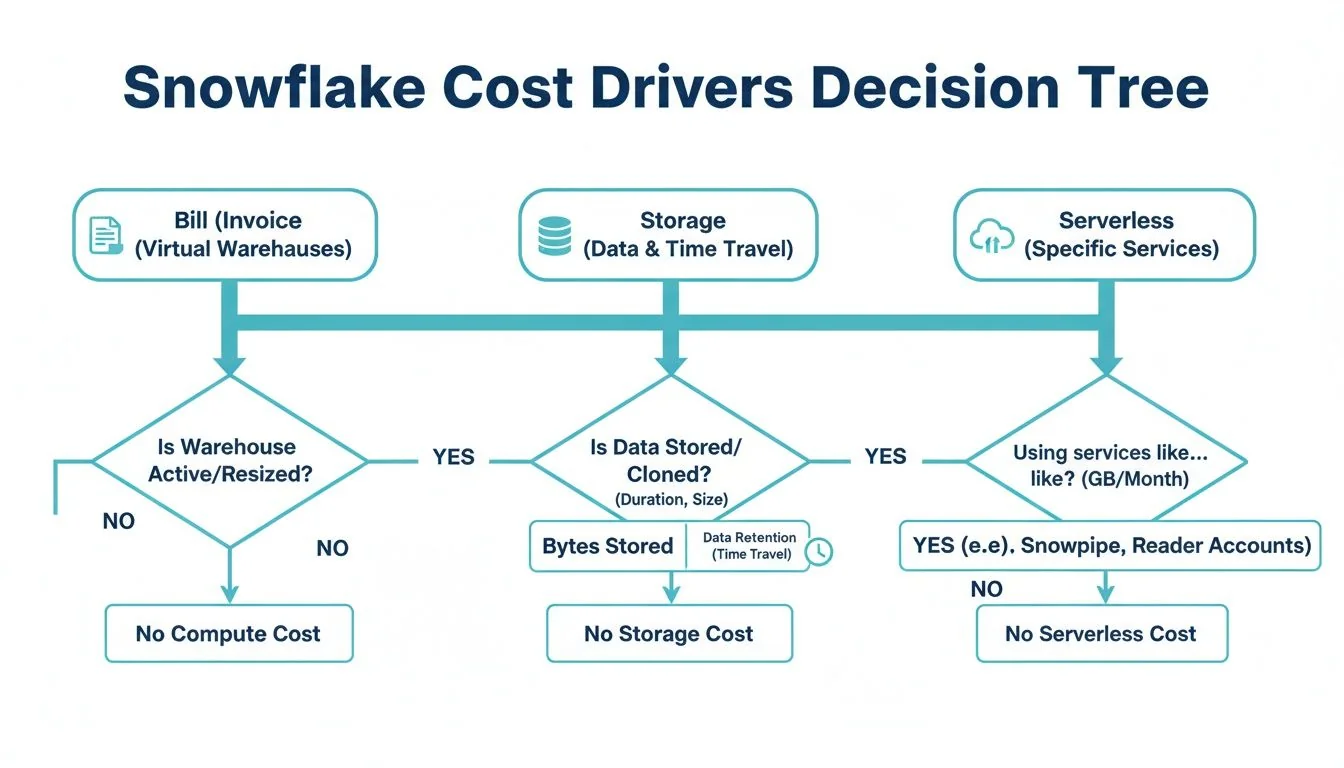
As illustrated, compute is the dominant branch, reinforcing the need to focus optimization efforts here first.
Warehouse Right-Sizing Is Your Biggest Lever
Selecting the appropriate warehouse size is fundamental to Snowflake cost optimization. The impulse to provision a larger warehouse for “better performance” often results in paying for unused capacity.
Remember, each increase in warehouse size doubles credit consumption. This exponential scaling can quickly become unmanageable.
For example, Large or X-Large warehouses consume credits at rates 8 to 32 times higher than an X-Small. Many routine workloads, such as data loading or standard BI queries, cannot utilize more than 10-16 cores. Any capacity beyond that is wasted. Downsizing a warehouse often has no discernible impact on performance but yields substantial cost savings. You can learn more about the impact of these warehouse sizing strategies at revefi.com.
The principle of right-sizing is to match compute resources to the workload. Using an X-Large warehouse for a simple data loading script is inefficient and unnecessarily expensive.
To do this effectively, you must analyze your workloads. A practical test is to monitor query performance on different warehouse sizes. If a query completes in two minutes on a Medium and one minute and fifty seconds on a Large, you are paying double the credits for a negligible ten-second improvement.
Snowflake Warehouse Sizing Cost and Use Case Matrix
This table provides a practical guide for matching common data workloads with the appropriate warehouse size to prevent over-provisioning.
| Warehouse Size | Credits per Hour | Example Use Case | Optimization Tip |
|---|---|---|---|
| X-Small | 1 | Ad-hoc queries; development environments; light data loading. | Optimal for individual developers. Set an aggressive auto-suspend timer. |
| Small | 2 | Scheduled data ingestion (COPY INTO); BI dashboards with low concurrency. | Ideal for lightweight, automated tasks. Monitor query queuing to assess scaling needs. |
| Medium | 4 | Running dbt models for small to mid-sized projects; moderately complex transformations. | A solid default for many ELT/ETL jobs. Test against a Small warehouse to find the optimal size. |
| Large | 8 | Complex transformations on large datasets; initial data backfills. | Reserve for heavy-lifting; ensure it does not run idle. Isolate from other workloads. |
| X-Large | 16 | Intensive data science modeling; processing multi-billion row tables. | For exceptionally demanding jobs only. This size accrues costs rapidly; monitor it closely. |
| Multi-Cluster | Varies | High-concurrency BI dashboards with many active users (e.g., Looker, Tableau). | ”Scale out” to handle user volume and prevent query queuing, rather than “scaling up.” |
Use this table as a starting point. Always validate with your specific workloads to determine the optimal balance between performance and cost.
Consolidate Warehouses and Isolate Workloads
“Warehouse sprawl”—where each team or developer has a dedicated warehouse—is a common anti-pattern that leads to significant waste. It results in multiple underutilized warehouses consuming credits.
A more efficient approach is to organize resources around workloads, not teams. This involves creating dedicated, purpose-built warehouses for specific job types.
- Ingestion Warehouse (e.g., Small): A smaller warehouse dedicated to running
COPY INTOcommands and other data loading scripts. - Transformation Warehouse (e.g., Medium/Large): A more powerful warehouse for complex dbt models or other intensive ELT jobs.
- BI & Analytics Warehouse (e.g., X-Small, Multi-cluster): A warehouse optimized for high concurrency to support numerous simultaneous dashboard users.
Isolating workloads prevents resource contention, such as a long-running transformation blocking an executive dashboard query. This improves performance and allows for precise sizing of each warehouse.
Scale Up vs. Scale Out: A Simple Framework
Once workloads are isolated, a key decision is whether to “scale up” (use a larger warehouse) or “scale out” (add more clusters). The choice depends on the problem you are solving.
Use this framework:
- Is the problem query complexity? For a few large, complex queries (e.g., massive joins), scale up. A larger warehouse provides more memory and processing power to execute the job efficiently.
- Is the problem user concurrency? For a high volume of smaller, faster queries (e.g., a popular BI dashboard), scale out. A multi-cluster warehouse is designed to handle this load without forcing users into a queue.
Use Aggressive Auto-Suspend and Maximize Caching
Two simple yet highly effective tactics are shutting down idle resources and leveraging caching.
First, set auto-suspend timers aggressively. A starting point of 60 seconds is recommended. Every minute a warehouse sits idle is wasted money. While a 5 or 10-minute timer may seem safer, the accumulated idle time results in significant unnecessary spend.
Second, promote practices that utilize Snowflake’s result cache. When the same query is executed repeatedly—a common pattern for dashboards—Snowflake can return the result from its cache in milliseconds without activating a warehouse. This is effectively a “free” query. Encourage the use of standardized reports and query patterns to maximize cache hits.
Fine-Tuning Your Queries and Storage for Deeper Savings
After optimizing compute warehouses, the next layer of cost control involves query structure and data management. Inefficient queries are a significant hidden cost, forcing Snowflake to scan excessive amounts of data and burning credits.
An unoptimized query is like asking a librarian to read every book in a library to find one sentence. An optimized query is like providing the exact shelf and page number. The difference in effort and cost is immense.
Master Your Queries to Minimize Data Scans
The most effective query optimization technique is reducing the amount of data Snowflake needs to scan. Every byte read from storage has an associated cost.
Table clustering is a key technique. If queries frequently filter on a specific column (e.g., a date or customer ID), you can instruct Snowflake to physically co-locate data in storage based on that column’s values. This dramatically reduces micro-partition scanning. Well-implemented clustering and query tuning can reduce query costs by 70-90% on large tables by eliminating wasteful data reads.
Another powerful tool is the Materialized View, which is a pre-computed result set for common and complex queries.
A Materialized View functions as a pre-built summary. Instead of re-calculating a complex sales metric each time an executive dashboard loads, Snowflake retrieves the pre-computed result. This significantly reduces compute consumption and delivers near-instantaneous query performance for those workloads.
Finally, you must implement query timeouts. A single runaway query, such as an accidental cross-join on two large tables, can run for hours and generate a massive bill. Setting a STATEMENT_TIMEOUT_IN_SECONDS parameter at the warehouse or user level acts as a critical safety net. It automatically terminates queries that exceed the time limit, preventing budget-breaking incidents.
Get Strategic With Your Storage
While storage is a smaller portion of the bill, unchecked data growth leads to significant costs. The goal is to balance data recoverability needs with storage expenses.
The Time Travel retention period is a primary setting to review. While useful for data recovery, the default 90-day retention on a large, frequently updated table can nearly double its storage footprint and costs.
Implement these strategies:
- Tiered Retention: Apply different retention periods based on data criticality. Use a short period (e.g., 1 day) for staging tables, a moderate one (7-14 days) for core business tables, and longer periods only for data subject to strict compliance requirements.
- Use Transient Tables: For temporary data, such as intermediate steps in an ELT pipeline, use
TRANSIENTtables. They have no Fail-safe period and a 1-day Time Travel window, which dramatically reduces their storage overhead.
Implementing these techniques effectively often requires a robust data architecture. To ensure your pipelines are both performant and cost-efficient, consider engaging a dedicated data engineering service.
Squeeze Every Drop of Value from Caching
Snowflake’s caching layers provide a free performance boost and should be fully leveraged. The result cache is particularly powerful. If an identical query is run twice, Snowflake serves the result from the cache without activating a warehouse.
This is highly impactful for BI dashboards. Train analysts to use standardized filters and avoid non-deterministic functions like CURRENT_TIMESTAMP(), which prevent cache hits by making each query unique. By promoting reusable query patterns, hundreds of users can access a dashboard while only the initial query consumes compute credits.
Building a Governance and Monitoring Framework
Optimization is a continuous discipline, not a one-time project. It requires a governance framework to ensure long-term success. Without structured monitoring and policies, initial gains will erode over time. The objective is to shift from reactive cost-cutting to a sustainable culture of financial accountability for data usage.

This is not about restricting access but about creating visibility and ownership. Every dollar of Snowflake spend should be attributable and aligned with business objectives. You are building a financial operating system for your data platform.
Establish a Clear Tagging Strategy
You cannot control what you cannot measure, and you cannot measure what you cannot identify. A consistent tagging strategy is the most powerful tool for governance. By tagging all compute resources—warehouses, tasks, and queries—you can attribute credit consumption directly to a specific team, project, or cost center.
A comprehensive tagging policy is the foundation for any showback or chargeback model, enabling you to demonstrate the cost of data initiatives to business units. This visibility alone drives more cost-conscious behavior.
Implement a mandatory set of tags:
team: The owning team (e.g.,marketing-analytics).project: The specific initiative (e.g.,q4-campaign-analysis).environment: The deployment stage (e.g.,prod,dev,test).
Standardizing this practice ensures all credit usage is tracked. Your bill transforms from an opaque total into a detailed ledger of business activities. For a deeper dive into setting up these policies, check out our guide on data governance best practices.
Implement Proactive Resource Monitors
Discovering a cost overrun at the end of the month is too late. Snowflake’s built-in resource monitors are your first line of defense. They function as automated circuit breakers to prevent budget overruns.
Resource monitors are non-negotiable for any production Snowflake account. They are the most direct and effective way to enforce budget ceilings and prevent a single runaway query from derailing your data budget.
Set credit quotas for the entire account or for individual warehouses. Configure monitors to take action at specific consumption thresholds. For example, send an email alert at 75% of the monthly quota, notify a broader team at 90%, and automatically suspend the warehouse at 100%. This simple configuration transforms a potential financial crisis into a manageable notification.
Leverage Third-Party Monitoring Tools
While native Snowflake tools are effective for setting hard limits, third-party cost management platforms offer deeper analytical intelligence. These tools integrate with your Snowflake account and use AI to uncover insights that are difficult to find manually.
Their strengths include:
- Anomaly Detection: Automatically identifying and alerting on sudden spikes in warehouse usage or query costs.
- Automated Recommendations: Analyzing usage patterns to suggest specific optimizations, such as warehouse downsizing or identifying unused tables.
- Root Cause Analysis: Enabling rapid drill-down to the specific user, query, or dbt model responsible for a cost spike.
These platforms function as a dedicated FinOps analyst for your Snowflake environment, continuously scanning for waste and highlighting opportunities for Snowflake cost optimization. They bridge the gap between high-level budget tracking and the granular, query-level analysis needed for continuous improvement.
Knowing When to Bring in Expert Help
Even with a skilled internal team, you may reach a point of diminishing returns in your Snowflake cost optimization efforts. Engaging external expertise is not a sign of failure but a strategic decision to accelerate results and prevent more costly long-term problems.
Engaging a data engineering consultancy is an investment in sustainable efficiency. These specialists possess deep experience across hundreds of Snowflake implementations and can identify architectural inefficiencies that internal teams, focused on daily operations, may miss.
The decision to hire external help is often triggered by specific scenarios, such as a complex data migration where a cost-effective architecture is critical from the start, or the need for a third-party audit to validate your strategy and uncover hidden savings.
Red Flags That Signal It’s Time for an Expert
If the following challenges sound familiar, it may be time to seek external assistance.
- Persistent Budget Overruns: Your Snowflake bill consistently exceeds forecasts, and your team cannot identify or remediate the root cause.
- Performance Degradation: Queries are slowing, dashboards are lagging, and the platform feels unresponsive, impacting business users and critical workflows.
- Lack of Specialized Skills: Your team excels at data analysis but lacks deep expertise in Snowflake architecture, advanced performance tuning, or FinOps practices.
- No Time for Proactive Optimization: Your engineers are consumed with project delivery and operational tasks, leaving no bandwidth for strategic, long-term cost management.
Viewing a consultancy solely as an expense is a mistake. The right partner should deliver a return on investment that significantly exceeds their fees, often within months, by unlocking savings and improving platform performance.
A good partner acts as a force multiplier, not only solving immediate cost issues but also transferring knowledge to your team to build a lasting culture of cost awareness. As you weigh your options, getting familiar with typical data engineering consulting rates will help you build a solid business case for the investment.
RFP Checklist for Snowflake Cost Optimization Partners
A well-structured Request for Proposal (RFP) is essential for selecting the right partner. It clarifies your needs and allows for objective comparison of vendors. Use this checklist to ask the right questions.
| Evaluation Category | Key Questions to Ask | Desired Response / ‘Green Flag’ |
|---|---|---|
| Proven Experience | Provide case studies of Snowflake cost optimization projects with quantifiable results (e.g., % savings). | They readily share detailed case studies showing 20-40% cost reductions and performance gains. |
| Technical Expertise | Describe your team’s certifications and direct experience with Snowflake features like clustering, caching, and warehouse management. | The team holds advanced Snowflake certifications and can discuss complex architectural patterns with specificity. |
| Methodology & Process | What is your process for auditing our environment? What tools do you use? How will you collaborate with our team? | They present a structured, phased approach: Audit -> Recommend -> Implement -> Monitor. They use a mix of native and third-party tools. |
| Knowledge Transfer | How do you ensure our team can maintain these optimizations after your engagement ends? | The proposal includes dedicated training sessions, documentation, and pairing their experts with your engineers. |
| ROI & Pricing | What is your pricing model? Can you provide a projected ROI based on our current spend and your initial assessment? | They offer flexible pricing (e.g., fixed-bid, retainer) and can build a conservative business case showing a clear path to positive ROI. |
This checklist is designed to evaluate both the content and the quality of the responses. A confident, transparent partner will provide detailed, evidence-backed answers that demonstrate their value.
Snowflake Cost FAQs: Your Questions Answered
Several common questions arise when managing a Snowflake environment. Here are direct answers to the most frequent inquiries.
What’s the Biggest Slice of the Snowflake Bill?
Without question, compute is the largest cost driver, consistently accounting for 75-85% of an organization’s total Snowflake spend. All compute costs are tied to virtual warehouses, which are billed on a per-second basis while active.
An oversized or idle warehouse consumes credits rapidly. This is why the highest-impact cost-saving measures—right-sizing warehouses, isolating workloads, and implementing aggressive auto-suspension—all target compute consumption.
How Can I Lower My Snowflake Bill Right Now?
For immediate impact, take these two actions today.
- Implement Aggressive Auto-Suspend: Change your warehouse auto-suspend timers from the default (often 5 or 10 minutes) to 60 seconds. This single change eliminates payment for idle time, a primary source of waste.
- Downsize Over-provisioned Warehouses: Identify your most expensive warehouses and analyze their workloads. If an X-Large warehouse is running simple BI queries, scale it down. In many cases, you can reduce costs significantly with no noticeable impact on performance.
Do I Pay for Queries That Fail?
Yes. Snowflake bills for compute time regardless of whether a query succeeds or fails. If a query runs for five minutes before terminating due to an error, you are charged for those five minutes of warehouse uptime.
This is why implementing query timeouts and using SQL linters in your development workflow is essential. These are simple safety measures that prevent you from paying for compute that delivers no value.
Are “Serverless” Features Actually Free?
No. Features like Snowpipe, Automatic Clustering, and Materialized View maintenance are termed “serverless” because Snowflake manages the underlying compute, but you still pay for that compute. These costs appear on your bill as credits consumed by background services.
While efficient for specific use cases, their costs can accumulate if unmonitored. For example, enabling automatic clustering on a large, infrequently queried table is a common way to incur background costs for minimal benefit. You must evaluate the cost-benefit of every serverless feature you enable.
Navigating these complexities can be challenging. At DataEngineeringCompanies.com, we independently rank and review firms to help you find a partner who can help you master your Snowflake environment. Explore our 2025 expert reviews and find your match today.
Data-driven market researcher with 20+ years in market research and 10+ years helping software agencies and IT organizations make evidence-based decisions. Former market research analyst at Aviva Investors and Credit Suisse.
Previously: Aviva Investors · Credit Suisse · Brainhub · 100Signals
Top Data Engineering Partners
Vetted experts who can help you implement what you just read.
Related Analysis
A Practical Guide to the Modern Architecture of a Data Warehouse
Explore the modern architecture of a data warehouse. This guide breaks down core layers, cloud patterns, and how to build a scalable data foundation.
10 Actionable Data Pipeline Testing Best Practices for 2026
Discover 10 actionable data pipeline testing best practices. This guide covers everything from unit tests to chaos engineering for modern data stacks.
A Practical Guide to Data Management Services
A practical guide to selecting the right data management service. Compare models, understand pricing, and learn key implementation steps to drive ROI.