Redshift vs BigQuery: The 2026 Enterprise Decision Guide
redshift vs bigquery, aws redshift, google bigquery, data warehouse, enterprise data platform
Redshift and BigQuery solve the same problem, cloud data warehousing at scale, with opposite operating models. Redshift is a provisioned cluster you tune; BigQuery is serverless compute Google manages for you. Pick based on which one matches your actual query patterns and cloud footprint, not which one sounds more modern.
Treat this as an ecosystem decision, not a warehouse feature bake-off. The platform you choose shapes who you can hire, which consultancies can deliver well, how painful your migrations become, and whether finance trusts your cost model. Of the 86 data engineering firms profiled in the Data Engineering Companies Index, 76 list AWS among their platforms and 56 list GCP - so the warehouse you pick also narrows which specialists you can realistically bring in.
Most Redshift vs BigQuery comparisons stay shallow and argue about speed in isolation. That’s the wrong frame. A warehouse doesn’t sit in isolation - it sits inside pipelines, governance, IAM, ML workflows, procurement, and partner delivery.
Is this really just a Redshift vs BigQuery feature comparison?
No. If your team thinks this is Redshift versus BigQuery on features, step back - you’re choosing between control inside AWS and elasticity inside GCP. That choice shows up in architecture reviews, FinOps meetings, and every consulting statement of work you sign for years.
The common assumption is that serverless always wins because it removes admin work. That assumption breaks down in enterprise environments with stable BI, large joins, governed semantic layers, and hard requirements for repeatable dashboard performance. In those conditions, tuned infrastructure beats abstracted infrastructure more often than teams expect.
Use this quick filter first.
| Decision area | Redshift | BigQuery |
|---|---|---|
| Operating model | Provisioned cluster | Serverless |
| Best fit | Stable BI and predictable reporting | Ad-hoc analysis and bursty workloads |
| Admin burden | Higher | Lower |
| Cost model | Provisioned capacity | Pay per query plus storage |
| Real-time ingestion | Native streaming (Kinesis/MSK) or Kinesis Firehose | Native streaming |
| Hiring profile | AWS data platform and performance tuning | GCP analytics and cost governance |
The wrong decision creates a slow, expensive consulting program. The right one sharpens delivery and aligns your warehouse with your cloud posture, operating model, and procurement realities.
Recommendation: If your core business depends on repeatable reporting for executives, finance, or operations, start by trying to disprove Redshift. If your business depends on wide, exploratory analysis with variable demand, start by trying to disprove BigQuery.
How do Redshift and BigQuery differ architecturally?
Redshift and BigQuery behave differently because they’re built on different assumptions. One assumes you want to provision and tune. The other assumes you want Google to abstract the machinery.
Redshift rewards teams that want control
Redshift is a cluster-based MPP system, which means performance isn’t just a product feature - it’s the result of choices your team or consultancy makes around distribution, sort keys, workload patterns, and maintenance.
That gives you control. It also gives you responsibility.
Redshift works well when your team has clear workload patterns and is willing to tune the platform for them: dashboards, recurring BI jobs, and large relational joins. If your data engineering function already lives in AWS, Redshift fits naturally with the rest of the estate. The trade-off is operational load - you don’t get a zero-admin experience, and the platform expects competence in tuning and ongoing maintenance.
BigQuery removes infrastructure decisions
BigQuery is serverless. Storage and compute scale independently, and Google assigns compute slots dynamically, which changes the staffing model as much as the technical model.
Teams can start fast, load data, query it, and skip cluster planning. That’s attractive in consulting-led modernization work because it pushes effort into modeling, governance, and workload management instead of infrastructure setup. BigQuery also fits variable demand better - it’s built for teams that don’t want to pre-plan capacity for every spike.
A related comparison worth reading is BigQuery vs Snowflake, especially if your team is also evaluating a broader warehouse shortlist.
Ingestion and concurrency expose the key difference
Architecture stops being abstract here. BigQuery ingests through native streaming with serverless autoscaling. Redshift historically leaned on Amazon Kinesis Firehose for streaming pipelines, though AWS now also offers native streaming ingestion directly from Kinesis Data Streams and Amazon MSK into materialized views, without staging data in S3 first (AWS’s streaming ingestion documentation).
On concurrency, Redshift’s default account quota is 50 query slots across manually defined workload management queues, confirmed directly in AWS’s Redshift quotas documentation - concurrency scaling clusters can add capacity beyond that. BigQuery historically capped interactive queries around 100 per project, but Google has since replaced that fixed ceiling with a dynamic query-queueing model that scales concurrency to available slot capacity rather than a hard number (Google Cloud’s query queues announcement).
That maps directly to consulting scope:
- If you choose Redshift, your partner needs strong AWS delivery skills - Glue, IAM, VPC design, streaming ingestion or Kinesis Firehose integration, workload tuning, and operational runbooks.
- If you choose BigQuery, your partner needs strong GCP analytics skills - slot management, cost controls, streaming design, and governance for self-service usage.
- If you plan real-time analytics, BigQuery is cleaner out of the gate.
- If you plan controlled enterprise BI, Redshift gives you more knobs and more accountability.
Architect’s view: Control is only an advantage if your team or partner knows how to use it. Otherwise, it becomes paid complexity.
Which platform performs better for your workload?
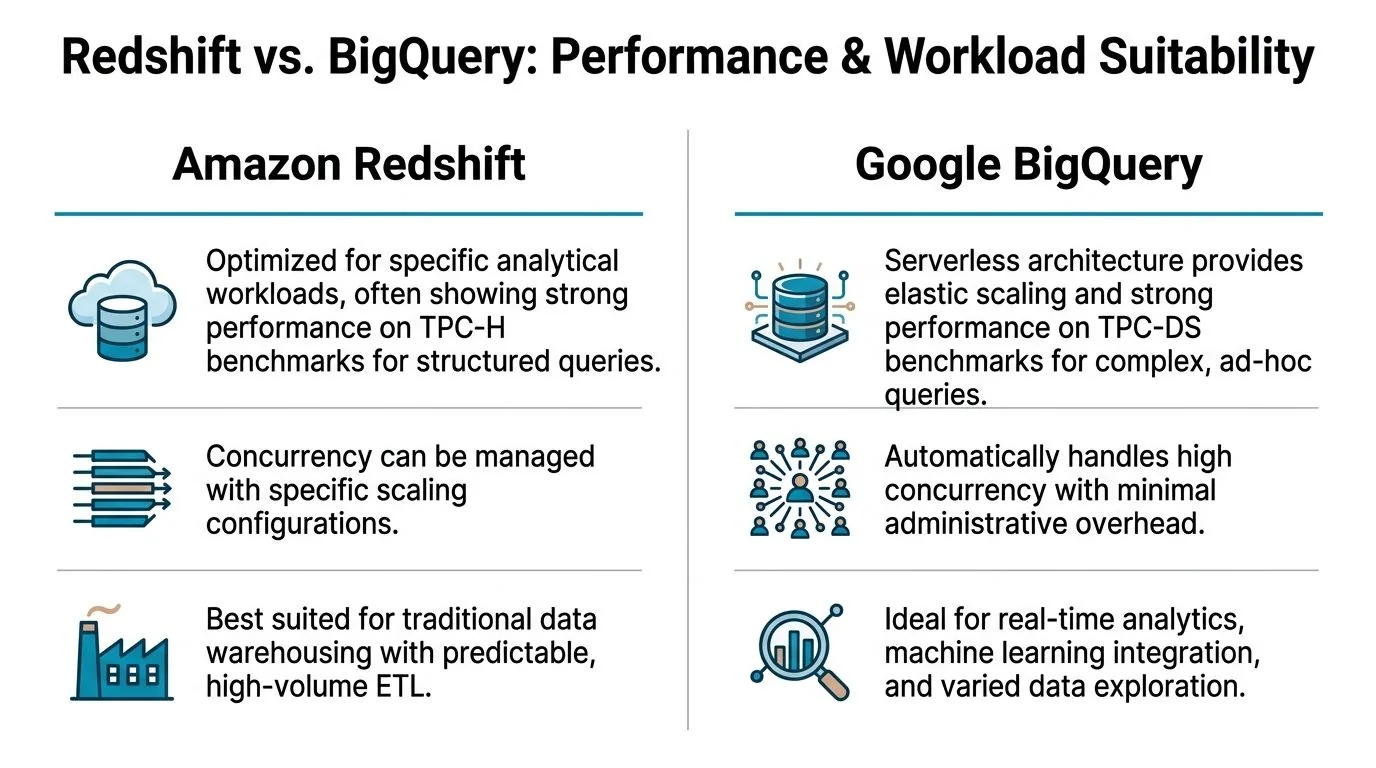
Ignore vendor chest-thumping and match the platform to the workload - Redshift’s own published benchmarks favor stable, join-heavy BI; BigQuery’s design favors variable, exploratory queries where you can’t predict tomorrow’s access pattern.
For enterprise BI, Redshift has the stronger benchmark story
AWS publishes head-to-head benchmark results that are useful directionally, even though they come from the vendor with something to prove. In AWS’s TPC-H benchmark at scale factor 1000, Redshift completed 18 of 22 queries with an average 3.6x faster elapsed time than BigQuery. In TPC-DS at 3TB scale, Redshift outperformed BigQuery on 94 of 99 queries by an average 6x faster elapsed time (AWS’s benchmark writeup). Treat these as a starting hypothesis to test against your own workload, not a verdict - AWS ran and published them.
TPC-style tests aren’t perfect, but they’re directionally useful for the workloads many enterprises commonly run:
- repeated BI queries
- large joins
- governed dashboards
- scheduled reporting
- concurrency from business users hitting the same semantic layer
If your warehouse feeds Tableau, QuickSight, or a dbt-driven reporting stack all day, Redshift deserves the default position.
For exploratory analysis, BigQuery is easier to run without planning
BigQuery wins a different argument. It’s better for teams that don’t know what they’ll query tomorrow - data science, broad scans, experimental segmentation, feature prep, and bursty analysis fit its design. That’s not just because it’s serverless; the system tolerates variability better than a cluster you have to shape in advance. When a team wants to hit a massive dataset with irregular patterns, BigQuery is usually the less painful platform to operate.
Here’s the practical rule:
| Primary workload | Better fit |
|---|---|
| Finance reporting | Redshift |
| Executive dashboards | Redshift |
| High-volume recurring BI | Redshift |
| Ad-hoc exploration | BigQuery |
| Variable data science workloads | BigQuery |
| Real-time streaming analytics pipelines | BigQuery |
The benchmark discussion is worth watching before you commit to a procurement direction.
Concurrency is not the same as predictability
A lot of teams ask the wrong concurrency question. They ask “how many users can it handle?” The better question is “how predictably does it handle the workload mix we have?” Redshift is stronger when the pattern is known and tuneable. BigQuery is stronger when the pattern is volatile. Those are different operational promises.
Use this test in your architecture review:
- List your top ten warehouse queries by business importance.
- Separate recurring queries from exploratory ones.
- Measure who runs them and when.
- Decide whether you value repeatability or elasticity more.
- Choose the platform that fits the dominant pattern, not the aspirational one.
Many teams over-index on future experimentation and underweight current reporting obligations. That’s a mistake. If your board pack, finance close, and ops dashboards drive daily decisions, optimize for that reality first.
Decision rule: Stable, business-critical SQL belongs on the platform built for repeatable performance. Unpredictable analytical spikes belong on the platform built for elastic compute.
Which platform costs less: Redshift or BigQuery?
Neither is cheaper in every scenario - BigQuery’s on-demand pricing rewards intermittent, well-scoped queries, while Redshift’s reserved capacity rewards steady, predictable usage. The right answer depends on how consistent your query volume actually is.
BigQuery is often cheaper when usage is intermittent
BigQuery’s on-demand pricing is $6.25 per TiB of data scanned, with the first 1 TiB each month free; active storage runs about $0.02 per GB per month (Google Cloud’s official BigQuery pricing page). That model rewards sporadic, well-filtered queries and penalizes wide, unfiltered scans. Redshift instead prices by reserved cluster capacity (or Redshift Serverless compute units), so the bill tracks the hardware you provision rather than the bytes you touch.
Integrate.io’s comparison of the two platforms estimates Redshift runs roughly 20% lower total cost of ownership for steady BI workloads, while BigQuery runs roughly 25% cheaper for ad-hoc analysis (Integrate.io’s guide). Treat those percentages as directional rather than a number to drop into a business case - they depend heavily on your query patterns and how disciplined your team is about scan size.
That maps cleanly to enterprise scenarios.
Scenario one: stable BI demand
If your teams run recurring dashboards every day on provisioned infrastructure, Redshift is usually the financially cleaner choice. You reserve capacity and know what you’re paying for. Finance likes that. Procurement likes that. Platform teams like that.
Scenario two: bursty exploration
If analysts and data scientists query large datasets irregularly, BigQuery often wins. Paying by query is efficient when you’re not keeping compute warm all day.
TCO depends on people, not just compute
The headline price isn’t the bill. Your total cost of ownership also includes the talent and consulting profile needed to operate the platform well.
Consider the hidden line items:
- Redshift’s hidden cost is specialist effort - you need people who can tune performance and manage the cluster well.
- BigQuery’s hidden cost is query sprawl - you need governance so teams don’t run expensive scans without discipline.
- Redshift’s procurement upside is reserved-instance savings and a more forecastable run rate.
- BigQuery’s operating upside is lower admin burden and faster setup for new workloads.
A direct way to frame Redshift vs BigQuery with finance:
| Cost lens | Redshift | BigQuery |
|---|---|---|
| Budget predictability | Stronger | Weaker without controls |
| Elasticity | Weaker | Stronger |
| Admin overhead | Higher | Lower |
| Ad-hoc cost efficiency | Lower | Higher |
| Stable BI cost efficiency | Higher | Lower |
A consulting partner shouldn’t just quote implementation cost - they should show how they’ll control warehouse spend after go-live.
How does platform choice affect migration and consultancy fit?
This is the part most technical comparisons skip. Redshift binds you tighter to AWS’s services and hiring pool; BigQuery binds you tighter to GCP’s analytics and AI stack. Both create real migration friction if you ever need to move.
Redshift binds you more tightly to AWS
Redshift sits inside AWS and works naturally with Glue, SageMaker, and IAM. That’s an advantage if your company already runs there - security reviews are easier, procurement is cleaner, and delivery is usually faster because the surrounding services are already approved and familiar. The downside is strategic rigidity: if multi-cloud flexibility matters, Redshift is the stickier choice.
BigQuery is stronger in mixed analytics and AI workflows
BigQuery fits organizations leaning into Google’s analytics and AI stack. It also handles direct external storage queries well, which can simplify some modernization patterns - a distinct advantage for teams building variable analytics products and ML-adjacent workflows.
Migrations into and out of BigQuery aren’t frictionless, though. According to Polestar Analytics, BigQuery’s nested data handling requires flattening when moving to Redshift, which complicates migration projects, and the same source notes that consultancies charge premiums for Redshift-to-BigQuery ports as part of broader modernization work (Polestar Analytics’ comparison). That should influence your partner selection process immediately.
If you need help structuring that search, this guide to choosing a cloud data warehouse consultant is a practical starting point.
What to demand from consulting partners
Don’t hire a generic “modern data stack” firm and hope they can fake depth. Force platform-specific proof.
Ask Redshift consultancies for:
- Performance tuning examples involving sort keys, distribution decisions, and workload management
- AWS integration depth across Glue, IAM, networking, and ingestion services
- Operational runbooks for maintenance and scaling
- Dashboard workload references using BI tools such as Tableau or QuickSight
Ask BigQuery consultancies for:
- Cost governance methods for pay-per-query environments
- Streaming architecture experience for real-time ingestion
- Data modeling approaches for semi-structured and nested data
- GCP integration depth across analytics and AI services
Procurement rule: Buy ecosystem competence, not slide-deck confidence. The warehouse is only one component of the delivery risk.
Which platform should you actually choose?
You don’t need a philosophical debate. You need a decision tool your leadership team can use this week - and it starts with mapping your actual workload mix, not your aspirational one, against the matrix below.
Redshift vs BigQuery decision matrix
| Evaluation Criterion | Key Questions for Your Team | Favors Redshift If… | Favors BigQuery If… |
|---|---|---|---|
| Primary workload profile | Are most queries recurring, governed, and business-critical? | Reporting, BI, dashboards, repeatable joins dominate | Exploration, experimentation, and irregular scans dominate |
| Cost model | Do you need fixed budgets or elastic consumption? | You want predictable spend and reserved capacity economics | You want pay-for-use economics tied to real query demand |
| Team skills | Do you have platform engineers and tuning expertise? | Your team can manage tuning and ongoing optimization | Your team wants minimal infrastructure management |
| Concurrency pattern | Are workloads stable or bursty? | Business users hit known dashboards repeatedly | Users run varied analytical workloads at unpredictable times |
| Ingestion design | Is real-time streaming central? | Batch-heavy pipelines are acceptable | Native streaming is a core requirement |
| Ecosystem fit | Which cloud stack is strategically dominant? | AWS is the operational center of gravity | GCP is the analytics and AI center of gravity |
| Migration risk | Will data model translation be painful? | You’re staying inside structured relational patterns | You benefit from nested or external-query-friendly designs |
| Consulting market fit | What partner profile do you need? | You want AWS-heavy delivery partners | You want GCP-heavy analytics specialists |
Three executive recommendations
Choose Redshift when reporting pays the bills
Pick Redshift if your company runs on recurring BI, executive reporting, and governed analytics, especially when your stack already centers on AWS and your data team can handle tuning discipline. This fits finance-heavy, operations-heavy, and dashboard-heavy environments.
Choose BigQuery when variability is the business model
Pick BigQuery if your demand profile is irregular, your teams need fast experimentation, and you want to minimize infrastructure ownership. This fits analytics groups that live in wide scans, AI and ML prep, and evolving data products - and it fits a consulting program that starts fast with less platform engineering upfront.
Do not choose either in isolation
Your warehouse doesn’t live alone. Review it with dbt, Airflow, ingestion, governance, IAM, BI tools, and ML plans in the same room - see data warehouse vs. data lake if the architecture question underneath this one is still open. If a consultancy can’t discuss the whole platform, remove them from the process.
RFP checklist for consultancy selection
Use this in your next vendor review.
-
Platform depth Ask for recent delivery examples specific to Redshift or BigQuery, not generic cloud data work.
-
Architecture stance Require a clear opinion on batch versus streaming, semantic layer design, and governance boundaries.
-
Cost control plan For Redshift, ask how they tune and right-size. For BigQuery, ask how they prevent query cost drift.
-
Migration method Require a written approach for schema translation, testing, rollback, and cutover.
-
Operations handoff Ask what your internal team will own after launch and what specialist skills you still need to hire.
-
Business workload mapping Make the partner map platform choices to actual workloads such as finance reports, product analytics, or ML prep.
Best engagement pattern by starting point
| Your situation | Best consulting engagement |
|---|---|
| Existing Redshift environment with rising cost or latency | Fixed-scope performance and cost audit |
| New AWS warehouse for governed BI | Foundation build with tuning, IAM, and BI workload validation |
| New BigQuery adoption for analytics modernization | Foundation build with FinOps guardrails and streaming design |
| Redshift to BigQuery migration | Discovery-first migration assessment before any full build commitment |
| Unclear choice between both | Paid architecture assessment with workload replay and operating model review |
The strongest CTOs make this decision with discipline. They don’t ask which platform is “best” - they ask which platform matches the company’s workload, cloud strategy, partner market, and tolerance for operational complexity.
If your core workloads are stable, choose Redshift. If your workloads are variable and exploratory, choose BigQuery. If your partner can’t explain the trade-offs in those terms, find another partner.
Specialist data engineering firms price differently by firm type and delivery model - see the consulting rates guide and get written quotes, then use the checklist above to confirm a quote maps to real platform depth, not a generic pitch.
- Part of our guide: AWS Data Engineering →
- Part of our guide: GCP Data Engineering →

Researched & written by
Peter Korpak , Chief Analyst & Founder
Data-driven market researcher with 20+ years in market research and 10+ years helping software agencies and IT organizations make evidence-based decisions. Former market research analyst at Aviva Investors and Credit Suisse.
Previously: Aviva Investors · Credit Suisse · Brainhub · 100Signals
- Accenture779000 people · unverified
Large enterprises running multi-cloud transformations across AWS, Azure, and GCP simultaneously, where a single integrator needs to own the full program.
Listed, not reviewed - Dateonic50 people · unverified
Teams building or scaling a Databricks or MLflow-based ML platform on AWS, Azure, or GCP. Ask for matching project references and named specialists.
Listed, not reviewed - Simform500 people · unverified
Consider Simform when application development and cloud data infrastructure need to be delivered together across AWS, Azure, GCP, Databricks, and Snowflake. Confirm workstream ownership.
Listed, not reviewed
More in AWS Data Engineering
A Pragmatic Guide to Cloud Migration Consulting Services for Data Leaders
A practical guide to cloud migration consulting services. Learn to choose partners, manage costs, and execute a successful data platform modernization.
Data Migration Best Practices: A Technical Blueprint for 2026
Explore data migration best practices for a smooth, low-risk transition. Learn planning, testing, and post-migration steps in this practical guide.
Your Cloud Migration Assessment Checklist: A Practical 10-Point Framework
Discover the cloud migration assessment checklist to plan cost, security, data, and vendor decisions for a successful 2026 migration.